

How to Run Multiple AI Agents on One VPS: Complete Guide (2026)
Want to run multiple AI agents without paying for separate servers? Learn how to host multiple AI agents on one VPS, organize independent workspaces, manage resources, configure agent communication, and build a scalable multi-agent automation environment.
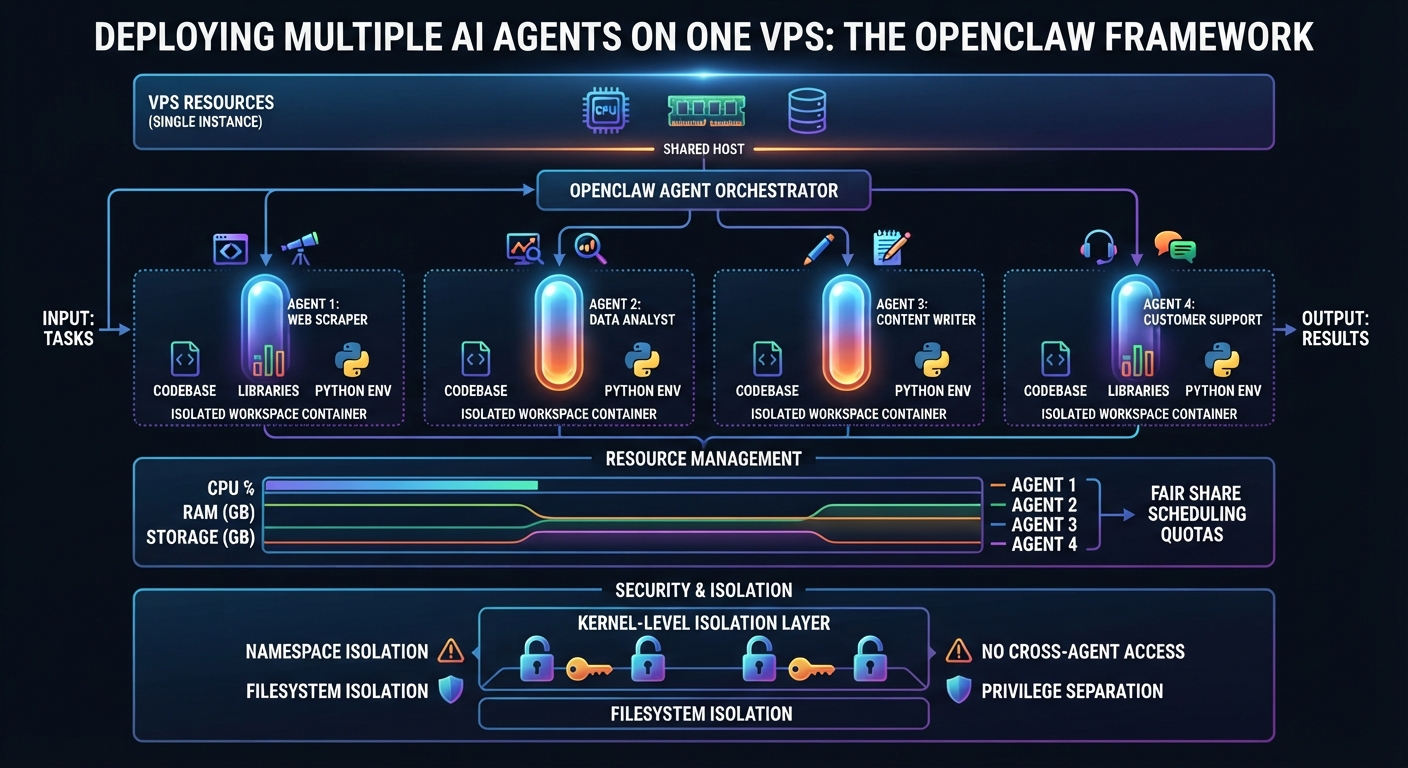
Artificial intelligence is moving beyond single assistants. Instead of asking one AI agent to handle every task, developers and businesses are increasingly exploring systems where multiple specialized agents work together.
Imagine having one AI agent managing customer support, another researching information, a third writing content, and a fourth handling business automation.
Each agent has a different responsibility, but they all operate within the same infrastructure.
This approach is known as a Multi-Agent System.
The good news is that you do not necessarily need a separate VPS for every AI agent. With the right architecture, you can run multiple AI agents on one VPS and manage them through a shared server environment.
In this guide, you will learn how multi-agent systems work, how to organize multiple agents on one VPS, what resources you need, and how to build a scalable AI infrastructure.
1. What Is a Multi-Agent AI System?
A multi-agent AI system consists of multiple AI agents that perform different tasks, responsibilities, or roles.
Instead of relying on one general-purpose assistant, you create specialized agents that focus on particular objectives.
For example, a business might use:
- A customer support agent.
- A marketing research agent.
- A content creation agent.
- A data analysis agent.
- A workflow automation agent.
Each agent can have its own instructions, tools, workspace, and model configuration.
The agents may operate independently or communicate through a shared workflow or coordination system.
How Does It Work?
Consider a company that wants to automate its content production process.
A multi-agent workflow could look like this:
- The research agent identifies relevant topics.
- The writing agent prepares an article draft.
- The SEO agent reviews keywords and metadata.
- The editing agent checks the content.
- The publishing workflow sends the approved article to a content management system.
Each agent handles a specific part of the process.
This structure can make complex workflows easier to organize, maintain, and improve.
However, adding more agents does not automatically improve results. Each agent needs a clearly defined responsibility and an appropriate workflow.
2. Why Run Multiple AI Agents on One VPS?
One of the biggest questions developers face is whether each AI agent needs its own server.
In many situations, the answer is no.
A single VPS can host multiple agents when the infrastructure has sufficient resources and the applications are configured correctly.
Here are the main advantages.
Lower Infrastructure Costs
Running each agent on a separate VPS can increase monthly hosting expenses.
For example, if you operate five independent agents, purchasing five separate servers may be unnecessary.
A shared VPS can host multiple agents and applications, provided the server has enough CPU, RAM, storage, and network capacity.
You still need to account for model API usage, which is generally separate from server hosting.
Centralized Management
Using one VPS makes it easier to manage your infrastructure from a central environment.
You can organize:
- Agent applications.
- Databases.
- Automation workflows.
- Shared services.
- Monitoring tools.
- Server backups.
This can simplify administration when multiple agents support the same business or project.
Easier Communication Between Agents
Agents running within the same infrastructure can communicate through configured APIs, messaging systems, databases, or agent-to-agent tools.
For example, a research agent can pass its findings to a writing agent.
The writing agent can then send its draft to a reviewing agent.
This creates a coordinated workflow without requiring every agent to run on a separate physical server.
Flexible Infrastructure
You can start with two agents and gradually expand your system.
As your workload grows, you can increase server resources, optimize workflows, or move selected workloads to separate infrastructure.
This allows you to build your multi-agent environment according to actual requirements.
3. How Many AI Agents Can One VPS Run?
There is no universal number.
The number of agents a VPS can support depends on their activity and resource consumption.
Important factors include:
- CPU requirements.
- Available RAM.
- Storage capacity.
- Number of active sessions.
- Concurrent executions.
- Background processes.
- Browser automation.
- Database operations.
- AI model inference.
An agent that receives occasional messages may consume relatively few resources.
An agent that continuously processes documents, operates a browser, and runs multiple background tasks can require significantly more resources.
Example VPS Resource Considerations
The following table provides illustrative planning profiles, not guaranteed capacity limits.
| Server Configuration | Possible Workload |
|---|---|
| 2 CPU / 4 GB RAM | Lightweight experiments and a small agent setup |
| 4 CPU / 8 GB RAM | Several lightweight agents and basic automation |
| 6 CPU / 16 GB RAM | More demanding workflows and additional services |
| 8 CPU / 32 GB RAM | Larger application environments and heavier concurrency |
Actual capacity depends on the agent runtime, workload, database, and additional services.
If you are running local AI models, GPU and memory requirements can change substantially.
For agents using cloud AI APIs, model inference happens on the provider's infrastructure, while your VPS handles the agent runtime, tools, sessions, and automation logic.
This distinction is important when planning server resources.
4. How OpenClaw Supports Multiple AI Agents
OpenClaw provides a multi-agent architecture that allows multiple isolated agents to operate within one Gateway process.
Each configured agent can have its own:
- Workspace.
- Instructions and personality.
- Authentication profiles.
- Model configuration.
- Session history.
- Tool permissions.
- Agent-specific settings.
This makes it possible to create specialized assistants without necessarily deploying a separate Gateway or VPS for each one.
For example, you could create three agents:
Research Agent
Responsible for collecting information, analyzing sources, and preparing research summaries.
Marketing Agent
Responsible for preparing content ideas, marketing drafts, and campaign materials.
Business Agent
Responsible for organizing tasks, reviewing reports, and managing approved business workflows.
You can configure routing rules to direct incoming messages to the appropriate agent.
OpenClaw also supports per-agent sandboxing and tool restrictions, which are important when different agents have different responsibilities and access requirements.
5. How to Set Up Multiple AI Agents on One VPS
Let's look at the general process for building a multi-agent environment using OpenClaw.
Step 1: Prepare Your VPS
Start with a Linux VPS that has sufficient resources for your expected workload.
Prepare the operating system and install the required OpenClaw runtime and dependencies using the official installation instructions.
Before adding multiple agents, verify that your main agent is working correctly.
Step 2: Create Separate Agent Workspaces
Each agent should have a clearly defined identity and working environment.
For example:
- Research agent.
- Marketing agent.
- Support agent.
Avoid placing all instructions, tasks, and configuration into one shared workspace without a clear organization strategy.
OpenClaw allows you to create additional agents using its CLI.
Example:
openclaw agents add research
openclaw agents add marketing
openclaw agents add support
Each configured agent receives its own workspace and state directory according to the configuration.
This helps keep agent instructions, sessions, and authentication profiles organized.
Step 3: Assign Different Responsibilities
Creating multiple agents is only useful when each one has a clear purpose.
For example:
Research Agent Instructions
- Collect information about assigned topics.
- Prepare structured research notes.
- Identify useful sources.
- Avoid publishing unverified information.
Marketing Agent Instructions
- Create marketing content drafts.
- Suggest campaign ideas.
- Prepare SEO metadata.
- Send drafts for review.
Support Agent Instructions
- Categorize incoming customer questions.
- Retrieve approved company information.
- Prepare suggested responses.
- Escalate sensitive requests.
Clear responsibilities reduce unnecessary overlap and make workflows easier to manage.
Step 4: Configure Agent Routing
Agent routing determines which agent receives a particular message or request.
For example, you might connect:
- Telegram account A to the support agent.
- Telegram account B to the research agent.
- A business messaging channel to the marketing agent.
OpenClaw supports bindings that connect channels and accounts to specific agents.
You should verify your routing configuration before allowing agents to receive real customer or business information.
Step 5: Configure Tools and Permissions
Not every agent needs access to every tool.
For example:
- A research agent may need browser access.
- A marketing agent may need document creation tools.
- A support agent may need access to approved knowledge sources.
- A monitoring agent may need limited server monitoring permissions.
Configure permissions according to each agent's responsibilities.
Avoid granting unnecessary administrative privileges.
For agents processing untrusted messages or external content, use appropriate sandboxing and stricter tool restrictions.
Step 6: Test Agent Communication
After configuring the agents, test how they exchange information.
For example:
- Send a research request to the research agent.
- Ask it to prepare a structured summary.
- Pass the result to the marketing agent.
- Ask the marketing agent to prepare a draft.
- Send the draft for human approval.
Test each stage separately before enabling the complete automation workflow.
Also implement safeguards against agents repeatedly responding to each other or entering communication loops.
6. How to Organize a Multi-Agent Architecture
A well-designed architecture is important when several agents share one VPS.
Here is a simple example of how the system could be organized.
Central Gateway
The Gateway manages agent communication and incoming messages.
Specialized Agents
Each agent has its own instructions, workspace, and session configuration.
Shared Services
Agents may use common services such as:
- Databases.
- APIs.
- Document storage.
- Workflow automation.
- Monitoring tools.
External AI Models
Agents can connect to supported cloud AI providers.
Each agent can use an appropriate model depending on its task and configuration.
Monitoring and Management
The VPS should also provide appropriate monitoring, logging, backup, and recovery mechanisms.
A simplified architecture:
                  Users
                    |
                    v
              OpenClaw Gateway
                    |
          +---------+---------+
          |         |         |
          v         v         v
       Research  Marketing  Support
        Agent     Agent     Agent
          |         |         |
          +---------+---------+
                    |
             Shared Services
                    |
          +---------+---------+
          |         |         |
        APIs     Database   Storage
                    |
                    v
               VPS Hosting
This is a conceptual architecture. The actual configuration depends on your chosen agent runtime and integrations.
7. Should You Use One VPS or Separate VPS Servers?
This is an important infrastructure decision.
Both approaches can work, but they solve different problems.
| Feature | One Shared VPS | Separate VPS Servers |
|---|---|---|
| Infrastructure cost | Usually lower | Usually higher |
| Central management | Simpler | More distributed |
| Resource sharing | Shared resources | Separate resources |
| Isolation | Requires careful configuration | Stronger infrastructure separation |
| Scaling | Shared server upgrades | Independent scaling |
| Failure impact | Can affect multiple agents | Easier to isolate failures |
When One VPS Makes Sense
A shared VPS is often suitable when:
- Agents support the same project.
- Workloads are relatively lightweight.
- Centralized management is important.
- Strong infrastructure-level separation is not required.
- The server has sufficient resources.
When Separate VPS Servers Make Sense
Separate servers may be better when:
- Agents process highly sensitive information.
- Different customers require stronger infrastructure separation.
- Workloads have very different resource requirements.
- Independent scaling is important.
- You need separate failure and security boundaries.
The best architecture is not necessarily the one with the most servers.
It is the one that provides sufficient performance, isolation, and reliability for your actual workload.
8. How to Manage CPU and RAM Across Multiple AI Agents
Resource management becomes increasingly important as you add agents.
Even if agents share one Gateway, their applications and background processes still consume server resources.
Here are several practices to consider.
Monitor CPU Usage
Track CPU consumption during normal operation and peak activity.
If several agents execute tasks simultaneously, CPU usage can increase.
Monitor RAM Consumption
Memory is particularly important when running browser automation, databases, and multiple application services.
Watch for memory pressure and unexpected process growth.
Use Containers Where Appropriate
Docker can help organize services and apply resource limits.
You can run supporting applications in separate containers and configure appropriate access to shared resources.
However, containers do not automatically guarantee complete security isolation.
Avoid Unnecessary Background Tasks
Do not schedule every agent to run continuously if the task only needs occasional execution.
Use scheduled jobs and event-driven workflows when appropriate.
Optimize Model Usage
Cloud AI API requests can create separate operating costs.
Use suitable models, control context size, and avoid unnecessary repeated calls.
9. Security Best Practices for Multi-Agent VPS Hosting
Running multiple agents introduces additional security considerations.
A mistake in one agent's permissions or configuration could affect other applications if the environment is poorly isolated.
Follow these practices:
Use Separate Workspaces
Keep each agent's instructions, files, and sessions organized independently.
Restrict Tool Access
Give agents only the tools necessary for their assigned responsibilities.
Use Sandboxing
Consider per-agent sandboxing, especially for agents processing untrusted information.
Protect API Credentials
Store credentials securely and avoid sharing sensitive keys unnecessarily between agents.
Control Agent Communication
Only allow the communication pathways that your architecture actually requires.
Monitor Agent Activity
Review unusual tool calls, repeated requests, failed executions, and unexpected resource usage.
Maintain Backups
Back up important configurations, agent workspaces, databases, and application data.
Remember that separate workspaces do not automatically create complete security boundaries. For strong isolation requirements, consider separate containers, operating-system boundaries, or separate VPS instances.
10. Real-World Multi-Agent Use Cases
Multi-agent systems can support different industries and business operations.
Here are several practical examples.
AI Marketing Team
A business could create:
- A market research agent.
- An SEO research agent.
- A content writing agent.
- A content review agent.
The agents work through a defined workflow to prepare marketing materials.
Human approval remains important before publication.
AI Customer Support Team
A support environment could include:
- An inquiry classification agent.
- A knowledge retrieval agent.
- A response drafting agent.
- An escalation agent.
This architecture helps organize customer inquiries and route complicated requests to human employees.
AI Development Team
Developers could configure:
- A coding agent.
- A code review agent.
- A testing agent.
- A documentation agent.
Each agent handles a different part of the development process.
AI Business Operations
A business could use multiple agents to:
- Organize internal tasks.
- Prepare daily reports.
- Analyze business information.
- Monitor selected services.
- Generate notifications.
The agents can operate within one VPS environment when the workload and security requirements permit it.
11. How AgentVPS Helps You Manage Multiple AI Agents
Building a multi-agent environment requires infrastructure, application configuration, and ongoing management.
AgentVPS combines private VPS infrastructure with a pre-installed Personal AI powered by OpenClaw.
This gives users a cloud environment where they can interact with their Personal AI and manage supported applications through chat or voice.
Instead of starting with an empty server and manually handling every infrastructure task, you can begin with an environment that already includes the Personal AI runtime.
AgentVPS provides:
- Private cloud VPS infrastructure.
- Pre-installed OpenClaw Personal AI.
- Persistent memory and skills.
- Application deployment and management.
- Docker and container support.
- Workflow automation integrations.
- Telegram and Discord access.
- Monthly AI credits.
- Support for connecting your own supported AI provider API keys.
You can use the infrastructure to build and manage your own applications and automation environment.
For multi-agent projects, the appropriate plan depends on the number of active workloads, concurrent tasks, and required server resources.
AgentVPS is designed to reduce repetitive infrastructure administration so developers and business owners can focus more on building useful AI-powered systems.
Want to build your own AI-powered team?
Explore AgentVPS and start creating an environment for your AI agents.
Frequently Asked Questions
1. Can I run multiple AI agents on one VPS?
Yes. Multiple AI agents can share one VPS when the server has sufficient resources and the applications are configured correctly. OpenClaw supports running multiple isolated agents within one Gateway process.
2. Do I need a separate VPS for every AI agent?
No. Separate VPS servers are not always necessary. A shared VPS can host multiple agents. Separate servers are more appropriate when you need stronger infrastructure isolation or independent resource allocation.
3. How much RAM do multiple AI agents need?
There is no fixed requirement. RAM usage depends on the agent runtime, number of active sessions, browser automation, databases, and other applications. Monitor actual memory consumption before increasing server capacity.
4. Can multiple OpenClaw agents work together?
Yes. OpenClaw supports multiple agents, routing, and agent-to-agent workflows. You can configure agents with different workspaces, responsibilities, tools, and model settings.
5. Can each AI agent have its own AI model?
Yes. OpenClaw supports per-agent model configuration, allowing different agents to use different model choices when supported and properly configured.
6. Is running multiple AI agents on one VPS cheaper?
It can reduce infrastructure expenses because multiple agents share one server. However, AI API usage, additional services, storage, and resource upgrades may still increase your overall operating costs.
7. Are multiple AI agents secure on one server?
They can be operated securely with suitable permissions, sandboxing, credential protection, and monitoring. However, a shared server is not equivalent to complete infrastructure-level isolation.
8. Can I scale my multi-agent system later?
Yes. You can increase server resources, optimize workloads, separate demanding services, or deploy selected agents on independent infrastructure as requirements grow.
Final Thoughts
Multi-agent AI systems offer an interesting way to organize complex tasks and build more capable automation environments.
Instead of asking one assistant to handle everything, you can create specialized agents that focus on research, development, marketing, customer support, and business operations.
With a properly configured VPS, multiple agents can share the same infrastructure without requiring a separate server for every role.
The most important factors are choosing suitable resources, organizing independent workspaces, managing permissions, controlling communication, and monitoring performance.
Start with a small number of specialized agents, measure their actual resource consumption, and expand your architecture as your requirements grow.
One VPS can be the foundation of an entire AI-powered team.
Was this helpful?
Be the first to like this article Tap the thumb to like this article — you can optionally share more detail afterward.