How Much Does It Cost to Run an AI Agent on a VPS? (2026 Guide)
How much does it really cost to run an AI agent on a VPS? Discover the main expenses, including server hosting, AI API usage, memory, storage, and automation tools. Compare hosting options and learn how to build a cost-effective AI agent environment in 2026.
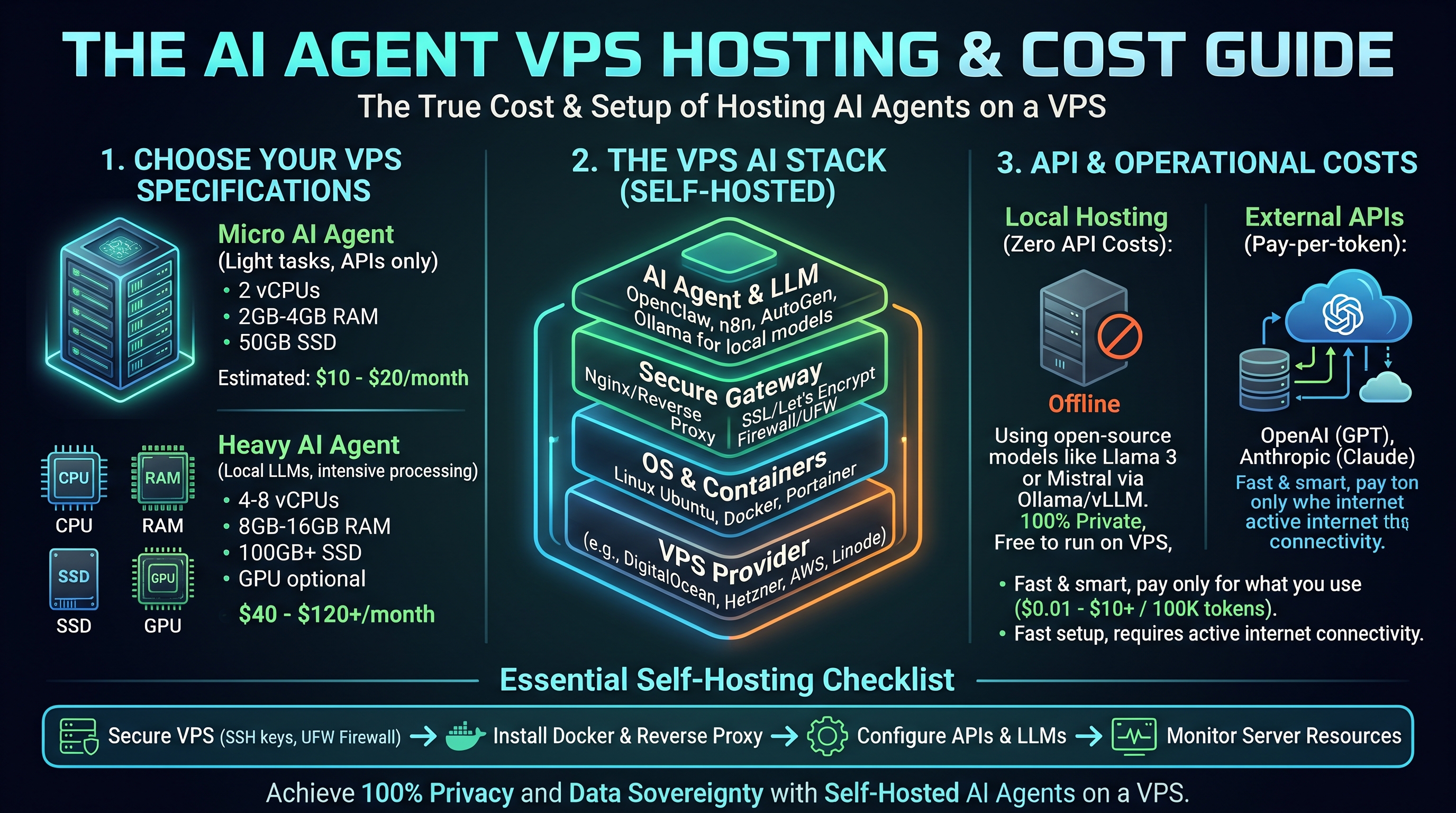
AI agents are becoming an important part of modern businesses. They can answer customer questions, automate repetitive tasks, manage applications, process information, and execute complex workflows with minimal human involvement.
But before deploying an AI agent, one important question comes up:
How much does it actually cost to run an AI agent 24/7?
The answer depends on several factors, including VPS hosting, AI model usage, server resources, storage, and the complexity of your automation workflows.
Some AI agents require only a small server and occasional API requests. Others process thousands of messages, connect to multiple applications, and perform continuous background tasks.
In this guide, we break down the real costs of AI agent hosting in 2026, explain the difference between server expenses and AI API costs, compare hosting options, and show you how to build an affordable AI infrastructure without paying for resources you do not need.
1. What Determines the Cost of Running an AI Agent?
Running an AI agent involves more than paying for a VPS.
Your total monthly expenses usually come from several components.
VPS Hosting
Your VPS is the infrastructure where your AI agent operates.
It provides computing resources such as:
- CPU processing power.
- RAM for applications and background processes.
- SSD or NVMe storage.
- Network connectivity.
- Operating system and application environment.
The VPS cost depends on the server specifications and hosting provider.
A simple personal assistant may require fewer resources than an AI system running multiple automation workflows and applications.
AI Model and API Usage
Most AI agents connect to external AI models through APIs.
Every time an agent sends information to a model and receives a response, it may generate API usage costs.
These costs depend on:
- The selected AI model.
- Input tokens.
- Output tokens.
- Number of requests.
- Context length.
- Additional model capabilities.
- Tool and service usage.
For example, an agent that answers short messages generally has a different cost profile from one that analyzes large documents or performs complex research.
Some providers charge separately for text, image, audio, and other capabilities.
Storage and Database Costs
AI agents may need persistent storage for:
- Conversation history.
- User information.
- Application configuration.
- Workflow data.
- Documents.
- Logs.
- Database records.
A simple agent may use local storage and a lightweight database.
More advanced applications may require external database services, object storage, or vector databases.
Automation and Integration Tools
Your AI agent might connect to several external services.
For example:
- n8n for workflow automation.
- Telegram for messaging.
- Discord for communication.
- CRM platforms for customer management.
- External APIs for business operations.
- Databases for information storage.
Some integrations are free, while others have subscription fees or usage-based charges.
The important point is to calculate the complete operating cost rather than looking only at the VPS subscription.
2. How Much Does an AI Agent VPS Cost in 2026?
VPS hosting prices vary according to CPU, memory, storage, network capacity, and the level of infrastructure management included.
Here are the current AgentVPS plans as an example of how managed AI infrastructure is priced.
| Plan | CPU | RAM | Storage | Monthly price |
|---|---|---|---|---|
| Starter | 2 cores | 4 GB | 100 GB NVMe | $19 |
| Pro | 4 cores | 8 GB | 200 GB NVMe | $49 |
| Business | 6 cores | 32 GB | 300 GB NVMe | $99 |
These are the monthly billing rates. Annual billing currently offers lower effective monthly rates:
| Plan | Monthly rate | Annual billing equivalent |
|---|---|---|
| Starter | $19/month | $15/month |
| Pro | $49/month | $39/month |
| Business | $99/month | $79/month |
All three plans include private VPS infrastructure, Personal AI, persistent memory and skills, application deployment support, and monthly AI credits.
The plans are designed for different workloads:
Starter: Suitable for personal AI assistants, experiments, and smaller projects.
Pro: Designed for startups, SaaS projects, and more demanding automation workflows.
Business: Intended for teams, heavier automation, and resource-intensive applications.
Prices and plan specifications can change. Check the official AgentVPS pricing page before choosing a plan.
3. Understanding AI API Costs
One of the most important parts of your AI agent hosting budget is model usage.
A VPS subscription does not automatically cover every AI model request.
When your agent connects to an external model provider, API usage is generally billed separately unless it is covered by an included credit or subscription arrangement.
For example, an AI agent might perform these activities:
- Receive a customer message.
- Analyze the request.
- Retrieve relevant information.
- Generate a response.
- Decide whether another tool is required.
- Return the final result.
Depending on the architecture, some of these steps may generate additional model requests.
What Are Tokens?
AI providers commonly measure text usage in tokens.
A token is a small unit of text processed by an AI model. The exact number of tokens depends on the language, content, and model tokenizer.
Two important categories are:
Input tokens: The information sent to the AI model, including prompts, instructions, and relevant context.
Output tokens: The response generated by the AI model.
Providers may charge different rates for input and output tokens.
For example, the official OpenAI API pricing page lists model-specific input, output, and cached-input prices per million tokens.
You can review current rates here:
Other providers, including Anthropic and Google, also publish their own pricing structures.
Never assume that every AI model has the same cost.
Why Can AI API Costs Increase?
Several factors can increase model usage:
- Long conversation histories.
- Large system prompts.
- Repeated requests.
- Multiple agents working together.
- Unnecessary tool calls.
- Large document processing.
- Continuous background workflows.
- Complex reasoning tasks.
An agent that repeatedly sends the same large context to a model may consume more tokens than necessary.
Optimizing the workflow can therefore make a meaningful difference to your monthly expenses.
4. Local AI Models vs Cloud AI APIs
Another important decision is whether to use an external AI API or run a model directly on your own infrastructure.
Both approaches have advantages and disadvantages.
| Category | Cloud AI API | Locally Hosted AI |
|---|---|---|
| Infrastructure | Provider manages model servers | You manage model infrastructure |
| Initial setup | Generally simpler | More technical |
| GPU requirements | Usually not required on your VPS | Depends on the model |
| Billing | Usually usage-based | Infrastructure-based |
| Maintenance | Less model infrastructure management | More model management |
| Customization | Depends on provider | Greater infrastructure control |
Using Cloud AI APIs
With this approach, your AI agent runs on your VPS but communicates with an external AI provider.
Your VPS handles application logic, memory, tools, and automation.
The external provider handles model inference.
This is often a practical arrangement for users who want to run AI agents without purchasing or managing GPU infrastructure.
Running AI Models Locally
You can also host open-weight AI models on your own server.
However, this introduces additional infrastructure requirements.
Depending on the model size and quantization, you may need:
- More system RAM.
- Higher CPU performance.
- Dedicated GPU resources.
- Sufficient GPU memory.
- Faster storage.
- Additional configuration and maintenance.
A regular CPU-based VPS should not automatically be considered suitable for every local AI model.
For many beginners, using a cloud AI API with a VPS is a simpler starting point.
5. Three Common AI Agent Hosting Scenarios
Let's look at three typical situations and how their costs differ.
Scenario A: Personal AI Assistant
Imagine you want to run a personal AI assistant that can:
- Answer questions.
- Manage simple tasks.
- Connect to Telegram.
- Store useful information.
- Execute occasional automation workflows.
This workload usually involves moderate resource requirements and relatively limited activity.
Your main expenses are:
- VPS subscription.
- AI usage.
- Optional storage or integrations.
A smaller managed VPS plan may be sufficient, depending on the selected applications and activity.
Scenario B: Business AI Automation
Now imagine a business using an AI agent to process incoming customer inquiries.
The system might:
- Receive customer messages.
- Classify requests.
- Retrieve customer information.
- Generate suggested responses.
- Update a CRM.
- Notify employees.
- Run scheduled workflows.
This workload requires more processing, application integrations, and potentially higher AI usage.
You should also consider backup policies, execution monitoring, and access controls.
A more capable VPS plan may be appropriate.
Scenario C: Multiple AI Agents
Some businesses use multiple specialized agents instead of assigning every task to one agent.
For example:
- A customer support agent.
- A research agent.
- A marketing agent.
- A data analysis agent.
- A workflow management agent.
Each agent may have different permissions, memory requirements, and model usage patterns.
As the number of agents increases, so can resource consumption and API expenses.
However, five agents do not necessarily require five separate VPS servers. Multiple agents can share infrastructure when the architecture, workload, and security boundaries allow it.
The important thing is to monitor actual CPU, RAM, storage, and API consumption.
6. How to Calculate Your Monthly AI Agent Cost
Before purchasing a VPS, estimate the total cost of your intended setup.
A useful formula is:
Total Monthly Cost = VPS Hosting + AI API Usage + Storage + Integrations + Optional Services
Let's break this down.
| Expense | What to Include |
|---|---|
| VPS | Monthly server subscription |
| AI models | Input and output token usage |
| Storage | Database, backups, and additional space |
| Integrations | Paid automation or business applications |
| Domain | Domain and DNS-related costs |
| Monitoring | Optional monitoring and alerting services |
Consider an example:
You operate a customer support agent on a VPS.
Your monthly budget should account for:
- The VPS plan.
- The estimated number of customer messages.
- The average context and response size.
- The selected AI model's pricing.
- Any additional services connected to the workflow.
You can estimate AI usage using this simplified formula:
Monthly API Cost = Input Token Cost + Output Token Cost + Additional Tool Costs
To improve your estimate, measure actual usage during a trial period rather than guessing based only on the number of messages.
Remember that included AI credits and direct API billing are different payment arrangements. Check the applicable credit rules and provider charges before calculating the final budget.
7. Seven Ways to Reduce Your AI Agent Hosting Costs
You do not need to choose the most expensive infrastructure to build useful AI automation.
The following practices can help control monthly expenses.
1. Choose the Right AI Model
Not every task requires the most advanced AI model.
A simple classification task may work with a smaller model, while complex analysis may justify a more capable one.
Route tasks according to their actual requirements.
2. Optimize Your Prompts
Long prompts can increase input token usage.
Remove unnecessary instructions, avoid sending irrelevant information, and keep context focused on the task.
3. Limit Repeated Tool Calls
An agent can waste resources when it repeatedly calls tools without making progress.
Set sensible execution limits, retry policies, and clear stopping conditions.
4. Use Memory Efficiently
Avoid sending an entire conversation history with every request when only a small amount of information is necessary.
Retrieve relevant information instead of repeatedly including unrelated context.
5. Automate Only What Needs Automation
Not every task needs to run continuously.
Use event-driven triggers or scheduled executions for tasks that do not require constant activity.
6. Monitor Usage Regularly
Track API consumption, server resources, and workflow executions.
Monitoring helps you identify expensive workflows and unexpected increases in usage.
7. Start Small and Upgrade When Necessary
Do not purchase a large server before understanding your workload.
Start with suitable resources, monitor performance, and upgrade when actual usage demonstrates a need.
This avoids paying for unused computing capacity.
8. Why Managed AI VPS Hosting Can Be More Convenient
Managing a traditional VPS involves more than paying for server resources.
You may also need to:
- Configure the operating system.
- Install AI agent software.
- Set up databases.
- Configure Docker.
- Manage application updates.
- Troubleshoot deployment problems.
- Monitor system performance.
- Maintain integrations.
For technically experienced developers, this level of control can be useful.
However, for business owners and people who want to focus on automation rather than server administration, managed AI infrastructure can simplify the process.
This is where an AI-managed VPS platform becomes interesting.
Instead of manually handling every infrastructure operation, you can use a Personal AI to help manage deployments, applications, and workflows.
9. How AgentVPS Helps You Manage AI Hosting Costs
AgentVPS combines private cloud infrastructure with a pre-installed Personal AI.
Instead of purchasing an empty virtual server and configuring every component yourself, you receive a VPS with an AI assistant designed to help deploy, manage, and maintain your infrastructure through chat or voice.
AgentVPS plans currently include:
- A private cloud VPS.
- Personal AI powered by OpenClaw.
- Persistent memory and skills.
- Monthly AI credits.
- Chat-based server management.
- Application and Docker deployment support.
- Telegram and Discord integration.
- Browser automation on supported plans.
- Cloud antivirus and malware protection.
The platform offers several plan levels to accommodate different workloads.
The Starter plan is designed for personal projects, the Pro plan for startups and automation workflows, and the Business plan for heavier workloads and teams.
You can also connect your own supported AI provider API keys when you need specific models or prefer direct provider billing.
This gives you flexibility when deciding how to manage your AI usage.
For developers, entrepreneurs, and business owners, AgentVPS offers a way to combine server infrastructure and AI management in one environment.
Explore the available plans:
10. Is Running an AI Agent on a VPS Worth the Cost?
The value of an AI agent should not be measured only by its hosting expense.
You should also consider the time it saves, the tasks it automates, and the business processes it improves.
For example, imagine an AI agent that handles repetitive administrative tasks every day.
If it reduces manual work, helps organize customer requests, or automates routine reporting, the value may exceed the infrastructure and AI usage expenses.
However, automation does not automatically guarantee financial savings.
You should measure:
- Time saved.
- Cost per completed task.
- Accuracy and reliability.
- Human review requirements.
- Monthly operating expenses.
- Business results.
A useful AI system is one that produces measurable value relative to its total cost.
Frequently Asked Questions
1. How much does it cost to run an AI agent on a VPS?
The cost depends on server specifications, AI model usage, storage, and connected applications. A complete budget should include both infrastructure and AI service expenses.
2. Is a cheap VPS enough for an AI agent?
A smaller VPS may be suitable for a lightweight assistant or simple automation workflow. However, resource requirements increase with additional applications, memory, concurrent executions, and local model inference.
3. Do I have to pay separately for ChatGPT or AI APIs?
When using an external provider API, usage is generally billed according to that provider's pricing. Some managed platforms include AI credits, while also allowing users to connect their own API keys.
4. Can I run an AI agent 24/7 on a VPS?
Yes. A VPS can keep your AI agent online continuously, provided that the server and applications are configured and maintained correctly.
5. Is local AI cheaper than using an API?
Not necessarily. Local inference may reduce external API usage, but it can require more expensive hardware, especially when GPU resources are needed. The best option depends on workload and usage volume.
6. Can I run multiple AI agents on one VPS?
Yes. Multiple AI agents can operate on one VPS when there are sufficient resources and suitable isolation. Monitor resource usage and separate sensitive workloads where necessary.
7. Does AgentVPS include AI credits?
Yes. AgentVPS currently includes monthly AI credits with its plans. The included amount differs by plan. Users can also connect supported external API keys when they prefer direct provider billing.
8. What is the best VPS plan for AI automation?
The best plan depends on the number of agents, applications, workflows, and expected activity. A personal project may need fewer resources than a business operating multiple automation workflows.
Final Thoughts
Running an AI agent in 2026 is becoming more accessible, but understanding the total cost is essential before choosing an infrastructure provider.
The server subscription is only one part of the budget. AI model usage, storage, integrations, and maintenance also contribute to the overall expense.
Start by understanding your workload, choosing suitable resources, and monitoring your actual usage.
Whether you are building a personal assistant, automating business operations, or deploying multiple AI agents, the right VPS environment can help you build a more reliable and cost-effective system.
Ready to run your own AI agent without managing every server detail manually?
Explore AgentVPS and choose an infrastructure plan that matches your AI automation goals.
Was this helpful?
Be the first to like this article Tap the thumb to like this article — you can optionally share more detail afterward.