AI Agent VPS: Complete Guide to Hosting AI Agents in 2026
Learn what an AI agent VPS is, how it works, what server resources you need, and how to choose the right VPS for running AI agents 24/7.
AI Agent VPS: Complete Guide to Hosting AI Agents in 2026
AI agents are moving beyond simple chatbots. They can monitor inboxes, run automations, call APIs, manage workflows, interact with databases, execute scheduled tasks, and operate continuously without someone keeping a laptop open.
But an AI agent needs somewhere reliable to run.
For many developers and businesses, that means using an AI agent VPS: a virtual private server configured to run AI agents continuously in the cloud.
In this guide, we'll explain what an AI agent VPS is, how AI agent hosting works, what server resources you need, and what to consider when choosing infrastructure for your agents.
What Is an AI Agent VPS?
An AI agent VPS is a virtual private server used to host and run autonomous or semi-autonomous AI applications.
Unlike running an agent on your personal computer, a VPS stays online 24/7 and gives your application dedicated server resources and a stable environment.
An AI agent running on a VPS can:
- Call LLM APIs such as OpenAI, Claude, or Gemini
- Run scheduled and background tasks
- Connect to databases
- Process webhooks
- Communicate through Telegram, Discord, Slack, or other platforms
- Connect to business APIs
- Run browser automation
- Store application data and logs
- Execute Python or Node.js applications
- Run Docker containers
- Monitor services continuously
This makes VPS infrastructure particularly useful for agents that need to operate continuously.
Why Host an AI Agent on a VPS?
You can run an AI agent locally during development, but production workloads usually need infrastructure that remains available even when your computer is turned off.
1. 24/7 Availability
A cloud VPS can remain online continuously.
Your agent can receive events, process jobs, answer messages, or run scheduled workflows at any time.
2. More Control
With a VPS, you control the operating system and software environment.
You can install tools such as:
- Docker
- Python
- Node.js
- PostgreSQL
- Redis
- Nginx
- Git
You can also configure environment variables, firewalls, background services, monitoring, and custom dependencies.
3. Persistent Storage
AI agents often need to maintain information between tasks.
A VPS provides persistent storage for databases, configuration, logs, uploaded files, and application state.
4. Easier API Integrations
Production agents frequently communicate with external services.
For example, an AI agent might receive a webhook, process the event with an LLM, update a database, and send the result through a messaging platform.
A continuously available server makes these workflows easier to operate reliably.
5. Multiple Services on One Server
One VPS can potentially run several components of an AI application.
For example:
AI Agent ↓ FastAPI / Node.js Backend ↓ PostgreSQL ↓ Redis ↓ External APIs
Docker can make these services easier to isolate and manage.
AI Agent VPS vs Running an Agent Locally
Running locally is usually fine for development and experimentation.
For continuous operation, however, a VPS offers several advantages.
| Feature | Local Computer | VPS |
|---|---|---|
| 24/7 operation | Difficult | Yes |
| Public endpoint | Requires configuration | Easy to configure |
| Persistent environment | Depends on device | Yes |
| Remote access | Limited | Yes |
| Background services | Possible | Designed for it |
| Production deployment | Less convenient | Better suited |
| Dedicated environment | No | Yes |
Local development and VPS deployment can also work together: develop and test locally, then deploy the stable version to your server.
AI Agent Server Requirements
There is no single VPS configuration that works for every AI agent.
The resources you need depend heavily on what the agent actually does.
Lightweight API-Based Agent
If your agent mainly calls external LLM APIs, the VPS usually does not perform the expensive model inference itself.
A starting configuration might be:
- 1–2 vCPU
- 2–4 GB RAM
- 20–50 GB SSD/NVMe storage
- Linux
- Reliable network connectivity
This can work for lightweight bots, webhook services, API integrations, and small automation workloads.
Medium AI Automation Workload
If the server runs multiple services, workers, databases, browser automation, or several agents, consider:
- 2–4+ vCPU
- 4–8+ GB RAM
- 50–100+ GB SSD/NVMe storage
The exact requirement depends on concurrency and the applications running alongside the agent.
Local AI Models
Running an LLM directly on your VPS is very different from calling an external AI API.
Local inference may require significantly more RAM, CPU resources, and potentially a GPU.
Before choosing a server, determine whether your agent will:
- Call an external model API, or
- Run the AI model directly on the server.
That distinction can dramatically change infrastructure requirements.
What Can You Host on an AI VPS?
An AI VPS can support many types of applications.
AI Customer Support Agents
Run an agent that receives customer messages, searches a knowledge base, generates responses, and connects with existing business systems.
Telegram and Discord AI Bots
A VPS can keep messaging bots online continuously and provide a backend for database access, API calls, and scheduled tasks.
Business Automation Agents
Agents can automate repetitive processes involving:
- CRM systems
- Calendars
- Databases
- Internal APIs
- Notifications
- Documents
Developer and DevOps Agents
AI agents can assist with operational tasks such as deployment workflows, monitoring, log analysis, and server management.
OpenClaw
Self-hosted agent platforms such as OpenClaw can also run on VPS infrastructure, giving users more control over where their agent environment operates.
How AI Agent Hosting Works
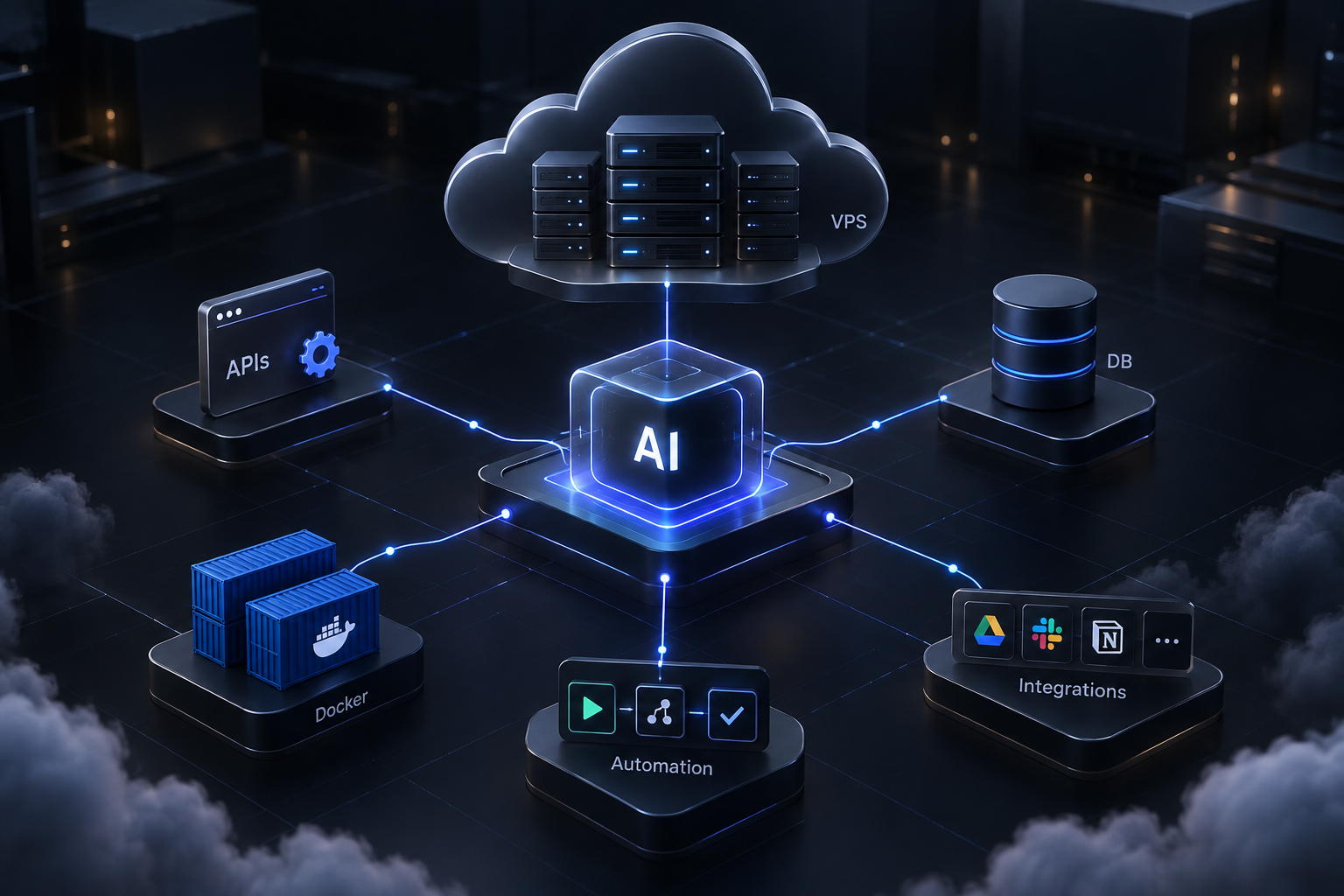
A typical architecture might look like this:
User / External Service ↓ Webhook or API ↓ AI Agent ↓ LLM API ↓ Tools / Database / External APIs ↓ Response or Action
The VPS hosts the persistent application layer.
The actual language model may run through an external provider, while your server handles application logic, authentication, integrations, databases, scheduling, and tool execution.
How to Choose the Best VPS for AI Agents
When comparing AI agent hosting providers, don't look only at price.
Consider the following factors.
CPU and RAM
Choose enough resources for your application, database, workers, and other services.
Running out of memory can cause applications or containers to restart unexpectedly.
SSD or NVMe Storage
Fast storage helps databases, logs, Docker containers, and applications perform consistently.
Network Reliability
AI agents often depend on external APIs.
Reliable connectivity is therefore important, especially for agents processing real-time events.
Server Location
A server closer to your users or external services can reduce network latency.
For globally distributed applications, location may be less important than reliability and architecture.
Root Access
Full server access gives developers more flexibility to install dependencies and configure the environment.
Docker Support
Docker is useful for packaging applications and running multiple services in isolated containers.
Backups
If your agent stores important application state or databases, maintain a backup strategy.
Monitoring
Production agents should be monitored for:
- CPU usage
- Memory usage
- Disk usage
- Application errors
- Container health
- Service availability
Traditional VPS vs AI-Native VPS
A traditional VPS gives you a server.
You typically connect through SSH and manually handle installation, deployment, configuration, monitoring, and troubleshooting.
An AI-native VPS can add an AI management layer on top of that infrastructure.
Instead of only providing server resources, the platform can help users perform operational tasks through natural-language instructions.
This is the approach behind AgentVPS.
AgentVPS combines private VPS infrastructure with AI-assisted server management, allowing users to deploy and manage applications while maintaining control of their own server environment.
AI Agent Hosting With AgentVPS
AgentVPS is designed around the idea that deploying an AI agent should not require spending hours manually configuring infrastructure.
You get a private VPS environment that can be used for AI agents, backend applications, automation services, APIs, databases, and Docker workloads.
The AI management layer can assist with tasks such as deployment, configuration, monitoring, and server operations.
This makes the platform useful for developers and businesses that want the flexibility of a VPS without handling every infrastructure task manually.
Self-Hosting vs Managed AI Agent Hosting
There are two common approaches.
Self-Hosted
You rent a standard VPS and configure everything yourself.
This provides maximum control but requires more Linux and DevOps knowledge.
AI-Assisted or Managed Hosting
The infrastructure provider helps simplify deployment and server management.
This can reduce the operational work required to keep an agent running.
The right choice depends on your technical experience and how much infrastructure management you want to handle yourself.
Security Considerations
AI agents can have access to sensitive systems, so security should be treated seriously.
At minimum:
- Use SSH keys instead of weak passwords
- Keep the operating system updated
- Configure a firewall
- Avoid exposing unnecessary ports
- Store API keys in environment variables or secret-management systems
- Restrict database access
- Back up important data
- Review logs regularly
- Give agents only the permissions they actually need
The more tools an agent can access, the more important proper permission management becomes.
Frequently Asked Questions
What is an AI agent VPS?
An AI agent VPS is a virtual private server used to host AI agents, automation services, APIs, databases, bots, and related applications in an always-available cloud environment.
Do AI agents need a VPS?
Not always. You can run an agent locally or use other cloud platforms. A VPS is useful when you want persistent operation, control over the environment, custom software, and continuous availability.
How much RAM does an AI agent need?
Lightweight agents that primarily call external LLM APIs may run with a few gigabytes of RAM. Agents running databases, browser automation, multiple containers, or local models can require considerably more.
Can I run multiple AI agents on one VPS?
Yes, provided the server has sufficient CPU, memory, storage, and network capacity. Docker can help isolate multiple applications.
Can I host OpenClaw on a VPS?
Yes. A VPS provides an always-on environment suitable for self-hosted agent platforms such as OpenClaw. Server requirements depend on the integrations and workloads you plan to run.
Do I need a GPU for an AI agent VPS?
Not necessarily. If your agent uses external APIs for model inference, a GPU usually isn't required on the VPS. A GPU becomes more relevant when you want to run suitable AI models directly on the server.
Final Thoughts
AI agents become much more useful when they can operate continuously rather than depending on a personal computer.
A VPS gives developers a persistent environment for running agents, APIs, databases, automation services, bots, and background workers.
The important part is choosing infrastructure based on the workload rather than simply buying the largest server available.
Start with the resources your agent actually needs, monitor usage, and scale as the workload grows.
If you want an AI-native VPS where server infrastructure and AI-assisted management work together, explore AgentVPS and choose a configuration that fits your workload.
Was this helpful?
Be the first to like this article Tap the thumb to like this article — you can optionally share more detail afterward.