

OpenClaw VPS: Complete Guide to Hosting OpenClaw 24/7
Learn how to host OpenClaw on a VPS, what server resources you need, and how to keep your AI agent running securely 24/7.
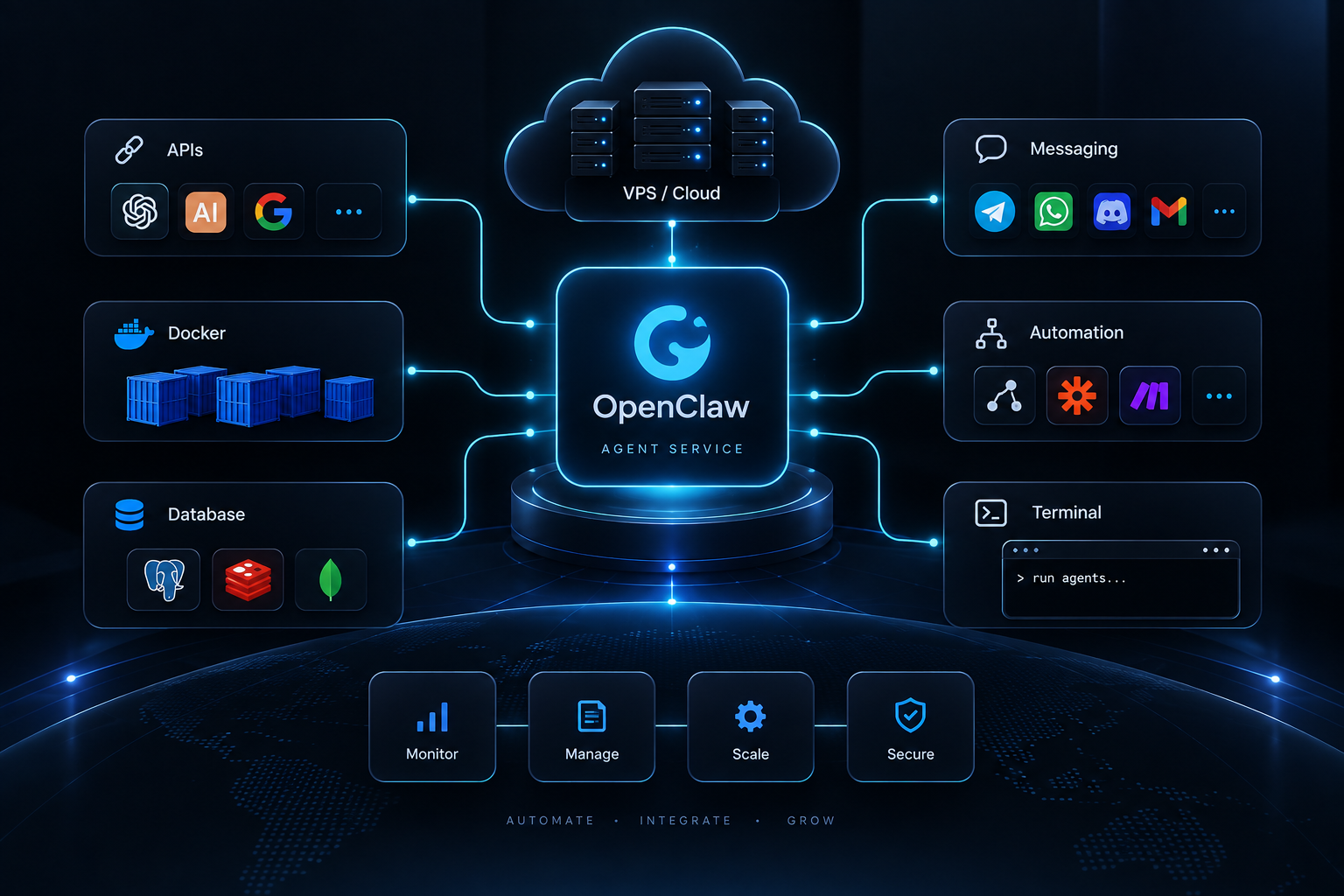
OpenClaw VPS: Complete Guide to Hosting OpenClaw 24/7
OpenClaw becomes much more useful when it can stay online continuously.
Running OpenClaw on your personal computer is convenient for development and testing, but your agent stops being available when the computer shuts down, loses its connection, or goes offline.
An OpenClaw VPS solves this by giving OpenClaw a persistent cloud environment that can run 24/7.
In this guide, we'll cover how OpenClaw VPS hosting works, server requirements, deployment options, security, and what to consider when choosing a VPS for OpenClaw.
If you're new to hosting AI agents in general, start with our AI Agent VPS guide.
What Is an OpenClaw VPS?
An OpenClaw VPS is a virtual private server configured to run OpenClaw continuously.
Instead of installing OpenClaw only on your laptop or desktop, you install it on a remote Linux server hosted in a data center.
The server stays available independently of your personal computer.
A typical setup looks like:
User ↓ Telegram / Discord / Other Integration ↓ OpenClaw ↓ AI Model / LLM API ↓ Tools and Services ↓ APIs / Databases / Automation
The VPS provides the persistent infrastructure that keeps this environment running.
Why Run OpenClaw on a VPS?
The main advantage is simple: your agent can remain available around the clock.
1. Run OpenClaw 24/7
A VPS doesn't depend on your laptop remaining powered on.
Your OpenClaw instance can continue handling messages, scheduled tasks, integrations, and background processes while you're away.
2. Access It From Anywhere
Because OpenClaw runs remotely, you can interact with your environment without being physically connected to the machine hosting it.
This is useful for developers, remote teams, and businesses operating agents continuously.
3. Dedicated Environment
A VPS gives OpenClaw its own environment for:
- Node.js
- Docker
- Databases
- APIs
- Automation scripts
- Logs
- Configuration
- Persistent files
This keeps your production agent separate from your development computer.
4. Better for Automation
OpenClaw can become more useful when connected to external services and workflows.
Depending on your configuration, your server may interact with messaging platforms, APIs, databases, webhooks, scheduled jobs, and other tools.
A continuously running VPS provides the infrastructure required for those workflows.
OpenClaw VPS Requirements
The right server size depends on what you plan to do with OpenClaw.
A lightweight personal agent does not necessarily need a large server.
Lightweight OpenClaw Setup
For a relatively simple instance using external AI APIs, a practical starting point can be:
- 1–2 vCPU
- 2–4 GB RAM
- 20–50 GB SSD or NVMe storage
- Modern Linux distribution
- Stable internet connection
Actual resource usage depends on your integrations and workloads, so monitor the server after deployment rather than treating these numbers as fixed requirements.
More Advanced OpenClaw Setup
Consider additional resources if you're running:
- Multiple integrations
- Several Docker containers
- Databases
- Browser automation
- Multiple agents
- High-volume workflows
- Other applications on the same VPS
A larger setup may use:
- 2–4+ vCPU
- 4–8+ GB RAM
- 50–100+ GB SSD/NVMe
The best approach is to start with reasonable resources, monitor utilization, and scale when necessary.
For a broader explanation of infrastructure sizing, see our AI Agent VPS guide.
Does OpenClaw Need a GPU?
Not necessarily.
There is an important difference between running OpenClaw and running an AI model locally.
If OpenClaw sends requests to an external LLM provider, the expensive model inference happens on the provider's infrastructure.
Your VPS primarily handles the agent, integrations, application logic, and related services.
In that situation, a GPU on your VPS may not be necessary.
If you want to run suitable AI models directly on your own server, however, hardware requirements can increase substantially.
OpenClaw VPS vs Running OpenClaw Locally
Both approaches have their place.
| Feature | Local Computer | VPS |
|---|---|---|
| 24/7 availability | Limited | Yes |
| Independent of your PC | No | Yes |
| Remote environment | Limited | Yes |
| Persistent services | Possible | Yes |
| Production use | Less convenient | Better suited |
| Server administration required | Minimal | Yes |
| Easy experimentation | Excellent | Good |
A useful workflow is to develop and experiment locally, then deploy the stable configuration to a VPS for continuous operation.
How to Host OpenClaw on a VPS
The exact installation process can change as OpenClaw evolves, so always check the current official OpenClaw documentation before deploying.
At a high level, the process usually involves the following infrastructure steps.
Step 1: Choose a VPS
Select a server with enough CPU, RAM, storage, and network capacity for your workload.
For a basic API-based agent, you usually don't need an expensive GPU server.
Step 2: Create the Server
Provision a Linux VPS and obtain administrative access.
Record the server IP and configure secure SSH access.
Step 3: Secure the VPS
Before deploying applications:
- Update system packages
- Use SSH keys
- Configure a firewall
- Disable unnecessary services
- Restrict exposed ports
- Create appropriate user permissions
Security should be configured before connecting sensitive integrations.
Step 4: Install Dependencies
Install the current dependencies required by your OpenClaw version.
Depending on your deployment, you may also use:
- Git
- Docker
- Docker Compose
- Node.js
- Reverse proxy software
Avoid blindly copying old installation commands from outdated tutorials. Verify versions against current OpenClaw documentation.
Step 5: Install and Configure OpenClaw
Follow the official installation process for your current OpenClaw release.
Configure the model providers, integrations, environment variables, and other settings required by your agent.
Never publish API keys or credentials in your source repository.
Step 6: Keep OpenClaw Running
A production deployment should automatically recover after:
- Server reboots
- Application crashes
- Unexpected process termination
Depending on your deployment method, this can be handled through containers or a suitable service manager.
Step 7: Configure Your Integrations
Once OpenClaw is running, connect the services your agent needs.
The exact integrations depend on your use case.
Keep permissions minimal: an agent should have access only to the systems and actions it actually requires.
Step 8: Test the Deployment
Before relying on the agent in production, test:
- Agent responses
- Integrations
- Authentication
- Restart behavior
- Network connectivity
- Logging
- Error handling
Rebooting the VPS once during testing is also useful. Your services should recover correctly without requiring a manual deployment every time.
Using Docker for OpenClaw
Docker can make an OpenClaw deployment easier to manage by keeping application dependencies isolated from the underlying operating system.
A container-based environment can also simplify:
- Deployment
- Updates
- Rollbacks
- Dependency management
- Service isolation
If your OpenClaw environment includes databases or supporting services, Docker Compose can help organize multiple containers.
Docker is not mandatory for every deployment, but it can make production infrastructure easier to reproduce.
OpenClaw Security Best Practices
An AI agent may have access to powerful tools and sensitive accounts.
That makes security particularly important.
Protect API Keys
Never hard-code secrets into public repositories.
Use environment variables or an appropriate secrets-management solution.
Use SSH Keys
SSH keys are preferable to relying on weak server passwords.
Configure a Firewall
Only expose ports that are actually required.
Your database, for example, usually should not be publicly accessible unless there is a specific reason and appropriate security controls.
Keep Software Updated
Regularly update:
- Linux packages
- OpenClaw
- Runtime dependencies
- Docker images
- Supporting applications
Limit Agent Permissions
An AI agent should not automatically receive unrestricted access to every system.
Use the principle of least privilege.
If an agent only needs to read certain information, don't give it unnecessary write or administrative permissions.
Monitoring OpenClaw on a VPS
Installing OpenClaw is only the beginning.
A production environment should also be monitored.
Watch:
- CPU usage
- RAM usage
- Disk space
- Application errors
- Container health
- Service uptime
- Network activity
Logs are especially important when debugging integrations or unexpected agent behavior.
Backing Up Your OpenClaw Environment
Consider what would happen if your VPS disappeared tomorrow.
Important data may include:
- Configuration
- Databases
- Application files
- Persistent agent data
- Automation scripts
- Docker volumes
Keep backups of anything that cannot easily be recreated.
Also test your recovery process occasionally. A backup isn't very useful if you cannot restore it.
Traditional VPS vs Managed OpenClaw Hosting
There are two broad approaches to hosting OpenClaw.
Traditional VPS
You receive a Linux server and handle the infrastructure yourself.
That typically means managing:
- Installation
- Linux configuration
- Security
- Deployment
- Updates
- Monitoring
- Troubleshooting
This approach gives experienced users significant control.
Managed or AI-Assisted OpenClaw Hosting
Another option is infrastructure that reduces some of the manual server-management work.
This can be useful if you want control of a private VPS while spending less time handling routine deployment and operations.
AgentVPS is built around this idea: combining private VPS infrastructure with AI-assisted server management.
Hosting OpenClaw With AgentVPS
AgentVPS provides private VPS infrastructure designed for AI agents, automation, backend applications, and other always-on workloads.
Rather than treating the VPS as only a remote Linux machine, AgentVPS adds an AI management layer designed to help with server operations such as deployment, configuration, and monitoring.
For OpenClaw users, this can provide a simpler path from experimenting with an agent to running it continuously in a cloud environment.
You still need to configure your OpenClaw instance and integrations appropriately, but the infrastructure layer can require less repetitive manual administration.
If you're comparing infrastructure more broadly, read our guide to AI agent VPS hosting.
Frequently Asked Questions
Can I run OpenClaw on a VPS?
Yes. A VPS provides a persistent server environment suitable for running self-hosted applications such as OpenClaw.
Can OpenClaw run 24/7?
Yes, when deployed to reliable always-on infrastructure and configured to restart correctly after failures or server reboots.
How much RAM does OpenClaw need?
It depends on the workload. A lightweight API-based deployment may need only a few gigabytes of RAM, while browser automation, databases, multiple containers, and additional services can increase memory requirements.
Do I need a GPU for OpenClaw?
Not necessarily. If your agent uses external LLM APIs, model inference happens outside your VPS. Local model hosting can have substantially higher hardware requirements.
Should I use Docker for OpenClaw?
Docker can make deployment and dependency management easier, particularly when you're running multiple services. Whether you need it depends on your architecture.
Is a VPS better than running OpenClaw on my computer?
For experimentation, a local computer is often easier. For an agent that needs to remain available continuously, a VPS provides a more suitable always-on environment.
Final Thoughts
Running OpenClaw on a VPS gives your AI agent a persistent environment that doesn't depend on your personal computer remaining online.
Start with a server sized appropriately for your workload, secure it properly, monitor resource usage, and scale only when necessary.
More importantly, treat the VPS as production infrastructure. Back up important data, protect credentials, monitor services, and keep dependencies updated.
If you want private VPS infrastructure with AI-assisted server management, explore AgentVPS for running OpenClaw and other always-on AI agents.
Was this helpful?
Be the first to like this article Tap the thumb to like this article — you can optionally share more detail afterward.