AI Agent Server Requirements: CPU, RAM & Storage Guide for 2026
How much CPU, RAM, and storage does an AI agent need? Compare server requirements for lightweight agents, automation, browser agents, and local AI models.
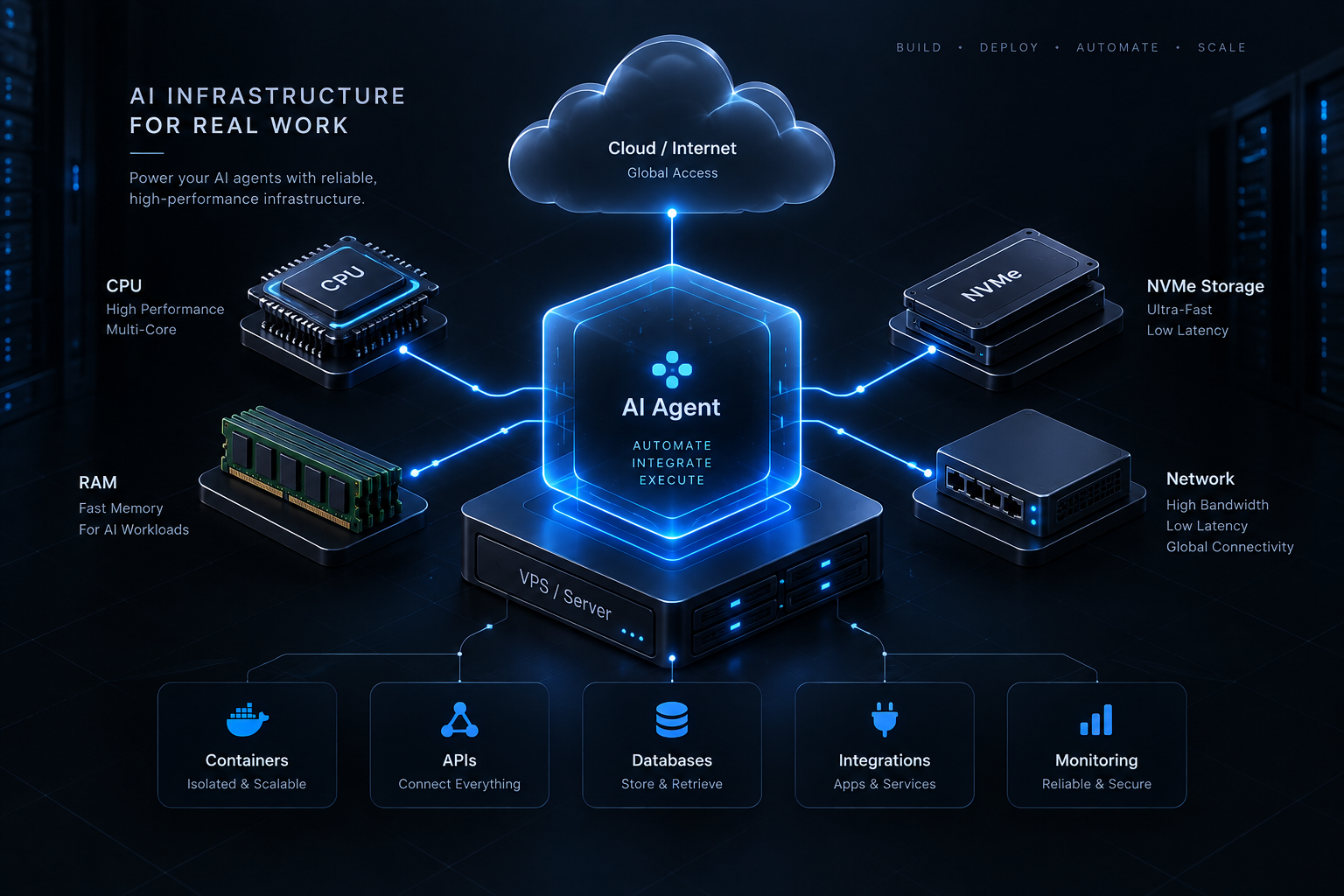
How powerful does a server need to be to run an AI agent?
The answer depends less on the term "AI agent" and more on what the agent actually does.
A lightweight agent that sends requests to an external LLM API may run comfortably on a small VPS. An agent running browser automation, databases, multiple Docker containers, or local AI models can require significantly more CPU, RAM, and storage.
This guide explains practical AI agent server requirements and how to choose an appropriate VPS without paying for resources you don't need.
If you're new to AI agent hosting, first read our complete AI Agent VPS guide.
Quick AI Agent Server Requirements
Here is a practical starting point.
| Workload | vCPU | RAM | Storage |
|---|---|---|---|
| Lightweight API agent | 1–2 | 2–4 GB | 20–40 GB |
| Telegram/Discord AI bot | 1–2 | 2–4 GB | 20–50 GB |
| Business automation agent | 2–4 | 4–8 GB | 40–80 GB |
| Multiple AI agents | 4+ | 8+ GB | 80+ GB |
| Browser automation agent | 2–4+ | 4–8+ GB | 40–80+ GB |
| Local AI model | Workload dependent | Often 16 GB+ | 100 GB+ |
| GPU inference | Workload dependent | Workload dependent | Model dependent |
These are starting points, not universal requirements.
Actual resource usage depends on your framework, integrations, concurrency, database, browser processes, containers, and whether model inference happens locally or through an external API.
The Most Important Question: API or Local Model?
Before choosing a VPS, determine where your AI model will run.
There are two very different architectures.
API-Based AI Agent
An API-based agent sends requests to services such as OpenAI, Claude, Gemini, or another model provider.
The expensive model inference happens on the provider's infrastructure.
Your VPS primarily handles:
- Agent logic
- API requests
- Webhooks
- Databases
- Scheduling
- Integrations
- Tool execution
- Logging
- Background workers
This means you often do not need a GPU.
For many API-based AI agents, 2–4 GB of RAM can be enough to get started.
Locally Hosted AI Model
If you want the server itself to run an AI model, the hardware requirements change dramatically.
Now the server may need to store the model and perform inference.
Depending on the model, this can require:
- More RAM
- More CPU capacity
- Much more storage
- A suitable GPU
- GPU memory (VRAM)
Don't choose a GPU server simply because your application uses AI.
If your agent calls an external LLM API, a normal CPU VPS may be all you need.
How Much RAM Does an AI Agent Need?
For many AI agents, RAM is one of the most important resources to monitor.
2 GB RAM
A 2 GB VPS can work for a lightweight agent.
For example:
- Simple Telegram bot
- Discord bot
- Basic webhook service
- Small Python agent
- Small Node.js agent
- External LLM API integration
However, 2 GB leaves limited room for additional services.
Running Docker, a database, multiple workers, and browser automation together can quickly consume the available memory.
4 GB RAM
For many small production AI agents, 4 GB is a more comfortable starting point.
It provides additional capacity for:
- Docker
- PostgreSQL
- Redis
- Background workers
- API servers
- Multiple integrations
- Monitoring
If you're unsure whether to choose 2 GB or 4 GB for a production agent, 4 GB generally gives you more room for growth.
8 GB RAM
Consider 8 GB when you're running:
- Multiple agents
- Browser automation
- Several Docker containers
- Larger databases
- Multiple background workers
- More concurrent requests
- Additional backend applications
The important factor is not simply how many agents exist, but what each process is doing.
16 GB+ RAM
Higher-memory configurations become useful for heavier workloads such as:
- Larger automation platforms
- Many concurrent workers
- Multiple browser sessions
- Data processing
- Local AI workloads
- Multiple databases or services
If you're running local models, memory requirements can increase much further depending on the model.
How Many CPU Cores Does an AI Agent Need?
CPU usage depends heavily on the workload.
A simple agent that spends most of its time waiting for API responses may use relatively little CPU.
1 vCPU
Can be sufficient for:
- Development
- Personal agents
- Low-volume bots
- Simple webhook processing
2 vCPU
A practical starting point for many small production agents.
Two virtual CPUs provide more room for the operating system and multiple application processes.
4+ vCPU
Consider additional CPU resources for:
- Browser automation
- Multiple agents
- High request volume
- Data processing
- Many Docker containers
- Concurrent background jobs
CPU-intensive workloads should be tested under realistic load rather than sized only from estimates.
How Much Storage Does an AI Agent Need?
AI agents themselves often don't require huge amounts of disk space.
Storage usage usually comes from everything around the agent.
This can include:
- Docker images
- Databases
- Logs
- Uploaded files
- Cached data
- Application code
- Backups
- Vector databases
20–40 GB
Often sufficient for lightweight agents and simple applications.
40–80 GB
Provides more room for databases, Docker images, logs, and multiple services.
100 GB+
May be appropriate when storing:
- Large datasets
- Significant user-generated content
- Local models
- Large vector databases
- Extensive backups
Choose SSD or NVMe storage where possible for better database and application performance.
Does an AI Agent Need a GPU?
For many agents, no.
Consider this architecture:
AI Agent ↓ OpenAI / Claude / Gemini API ↓ Model response
The model runs on the provider's infrastructure.
Your VPS doesn't perform the model inference.
A GPU becomes relevant when you want to run compatible AI models directly on your own infrastructure.
For example:
AI Agent ↓ Local Model ↓ GPU
The GPU requirements then depend on the specific model, precision, context size, inference engine, and expected concurrency.
Server Requirements for AI Chatbots
An AI chatbot using an external LLM API can be relatively lightweight.
A starting configuration could be:
- 1–2 vCPU
- 2–4 GB RAM
- 20–40 GB SSD/NVMe
This can support the application server, bot integration, and basic persistence.
If you're planning to host a production chatbot, see our guide to VPS hosting for AI chatbots.
Server Requirements for Telegram and Discord AI Bots
Telegram and Discord bots usually don't require large servers unless they handle substantial traffic or heavy background processing.
A starting point:
- 1–2 vCPU
- 2–4 GB RAM
- 20–40 GB storage
Resource requirements increase when you add:
- Multiple bots
- Large databases
- File processing
- Browser automation
- Many concurrent users
- Background queues
Server Requirements for AI Automation
Business automation agents often do more than respond to messages.
They may:
- Read webhooks
- Call multiple APIs
- Query databases
- Process documents
- Send emails
- Update CRM systems
- Run scheduled workflows
- Execute background jobs
For this type of workload, consider starting around:
- 2–4 vCPU
- 4–8 GB RAM
- 40–80 GB SSD/NVMe
Then monitor actual resource consumption.
Server Requirements for Browser Automation Agents
Browser automation is considerably heavier than simple API calls.
Headless Chrome or Chromium instances consume both CPU and memory.
If your AI agent uses browser automation, consider:
- 2–4+ vCPU
- 4–8+ GB RAM
- 40–80+ GB storage
Multiple simultaneous browser sessions can increase these requirements quickly.
Limit unnecessary concurrency and monitor memory usage carefully.
Server Requirements for OpenClaw
OpenClaw can run on VPS infrastructure, but the appropriate server depends on what you connect to it.
A lightweight setup using external AI APIs will have very different requirements from one running multiple integrations, containers, browser automation, and supporting services.
For a complete overview, read our OpenClaw VPS hosting guide.
A practical lightweight starting point may be:
- 1–2 vCPU
- 2–4 GB RAM
- 20–50 GB storage
More advanced environments may benefit from:
- 2–4+ vCPU
- 4–8+ GB RAM
- 50–100+ GB storage
Monitor actual usage and scale when necessary rather than assuming every OpenClaw deployment needs a large VPS.
What About Docker?
Docker itself adds some overhead, but the bigger consideration is the number and type of containers you're running.
For example, your stack might contain:
AI Agent ↓ API Server ↓ PostgreSQL ↓ Redis ↓ Worker ↓ Reverse Proxy
Each service consumes resources.
When choosing your VPS, size the server for the whole application stack, not just the AI agent process.
Database Requirements
Some agents need persistent memory or application state.
Common choices include:
- PostgreSQL
- MySQL
- Redis
- SQLite
- Vector databases
Small databases may require relatively little memory.
As your data and traffic increase, database performance can become an important part of server sizing.
Monitor database memory, storage growth, query performance, and connection counts.
Network Requirements
AI agents frequently communicate with external APIs.
That makes network quality important.
Consider:
- Network reliability
- Latency
- Bandwidth
- Data-transfer limits
- Server location
For API-heavy agents, a reliable network can sometimes matter more than adding another CPU core.
Recommended VPS Size for Most Beginners
If you're building a relatively small AI agent using external LLM APIs, a sensible starting point is:
2 vCPU + 4 GB RAM + 40 GB SSD/NVMe
This is not a universal requirement.
It's simply a balanced starting configuration that provides room for an agent, API server, basic database, Docker, and supporting services.
If your application is extremely lightweight, you may need less.
If you're running browser automation, multiple agents, local models, or heavy data processing, you'll likely need more.
Start Small and Scale
One common mistake is overprovisioning infrastructure before knowing the application's actual requirements.
Instead:
- Estimate your workload.
- Choose a reasonable starting server.
- Deploy the application.
- Monitor CPU, RAM, disk, and network usage.
- Identify bottlenecks.
- Scale when necessary.
This keeps infrastructure costs under control while giving you real data about your application's needs.
If you're still deciding which infrastructure to use, read our Best VPS for AI Agents guide.
AI Agent Server Requirements FAQ
Is 2 GB RAM enough for an AI agent?
It can be enough for a lightweight agent that uses external LLM APIs and runs few supporting services. More complex production environments may benefit from 4 GB or more.
Is 4 GB RAM enough for an AI agent?
For many API-based agents, 4 GB is a practical starting point. Browser automation, multiple containers, large databases, or local models can require more.
Do I need a GPU for an AI agent?
Not if your agent primarily uses external LLM APIs. GPU infrastructure becomes relevant when running compatible AI models locally.
Can I run multiple AI agents on one VPS?
Yes, if the server has sufficient CPU, RAM, storage, and network capacity for the combined workload.
Is CPU or RAM more important for AI agents?
It depends on the workload. Lightweight API agents may consume relatively little CPU, while multiple services and browser automation can increase both CPU and memory usage.
How much storage does an AI agent need?
A lightweight application may need only 20–40 GB. Databases, Docker images, logs, files, local models, and backups can increase storage requirements significantly.
Final Thoughts
There is no universal server specification for an AI agent.
A lightweight API-based agent might run comfortably with 1–2 vCPU and a few gigabytes of RAM, while browser automation, multiple agents, and local models can require considerably more.
The most important distinction is whether you're using an external LLM API or hosting the model yourself.
Start with infrastructure appropriate for your actual workload, monitor resource usage, and scale based on real demand.
For a deeper introduction to hosting agents in the cloud, read our AI Agent VPS guide.
If you're ready to deploy, AgentVPS provides VPS infrastructure designed for always-on AI agents, automation, APIs, databases, and containerized applications.
Was this helpful?
Be the first to like this article Tap the thumb to like this article — you can optionally share more detail afterward.