How to Keep AI Agents Running 24/7 Without Babysitting a VPS
Tired of your AI agents going offline when your laptop sleeps? Learn how to host AI agents on a VPS, keep them running overnight, and reduce manual server maintenance.
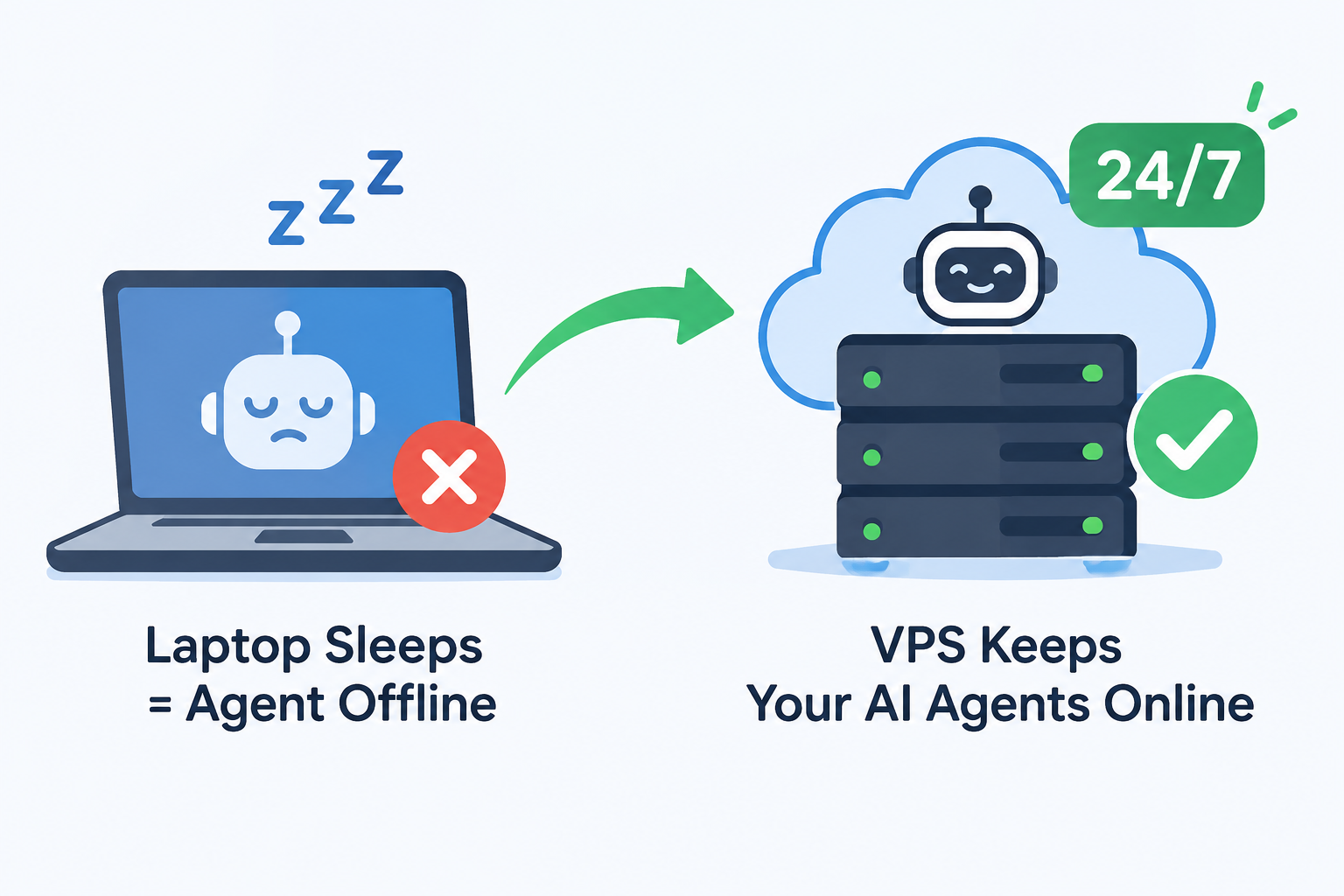
If you've been running AI agents on your laptop, you've probably experienced this problem: everything works perfectly until you close your laptop, lose your internet connection, or your computer goes to sleep.
Suddenly, your agent stops responding.
This becomes frustrating when you're running automation overnight, monitoring tasks, handling incoming messages, or managing business workflows.
You don't want to leave your computer running all day. You also don't want to SSH into a remote server every morning just to check whether your agents are still alive.
So, where should you host your AI agents?
For most developers running API-based AI agents, a VPS is a practical option. It gives your applications a remote environment that can stay online independently of your personal computer.
But choosing a VPS is only part of the solution. You also need a setup that can recover from failures without requiring constant manual intervention.
Let's look at how to do that.
Why Do AI Agents Stop Running on Your Laptop?
Running an AI agent locally is convenient during development, but it introduces several problems when you need continuous operation.
1. Your Laptop Goes to Sleep
Most laptops automatically enter sleep mode after a period of inactivity.
When this happens, background processes may stop running or lose their network connections.
Your agent might be working perfectly at midnight, but it won't necessarily be available when someone sends it a message at 3 AM.
2. Your Internet Connection Is Unreliable
A local AI agent depends on your home or office internet connection.
A router restart, temporary outage, or network configuration change can interrupt its connection to external APIs and messaging platforms.
3. Your Computer Can Restart Unexpectedly
Operating system updates, application crashes, power interruptions, and accidental shutdowns can stop your agent.
Unless you've configured automatic startup and recovery, you may need to restart everything manually.
4. Running Multiple Agents Becomes Difficult
You might start with one personal assistant and eventually add:
- A Telegram automation agent
- A customer support agent
- A lead generation agent
- A browser automation agent
- A monitoring agent
- A business workflow assistant
Managing all these processes on your personal computer can become inconvenient.
This is when moving your workloads to a remote server starts making sense.
Why a VPS Is a Better Place to Run AI Agents
A Virtual Private Server (VPS) provides a remote Linux environment where your applications can run independently of your personal computer.
Instead of relying on your laptop to stay online, your AI agents operate on infrastructure hosted in a data center.
Here are some practical advantages.
Keep Your Agents Online Overnight
A VPS is designed to run continuously.
You can close your laptop, turn off your computer, and disconnect from your home network without intentionally stopping the applications running on your server.
This is useful for:
- Overnight automation
- Scheduled background tasks
- AI assistants that receive messages
- Monitoring agents
- Customer support workflows
- Long-running data processing
Run Multiple Agents in One Environment
You can deploy several agents on the same VPS, provided you have enough resources.
For example, Docker allows you to run different applications in separate containers.
This makes it easier to organize your infrastructure and manage dependencies.
Access Your Server From Anywhere
A remote VPS is accessible over the internet.
You can manage your applications from another computer without needing to keep your original development machine running.
Scale When Your Workload Grows
As your agents become more complex, you can upgrade CPU, RAM, and storage.
You don't necessarily need to purchase a more powerful personal computer just to support additional background workloads.
But a VPS Doesn't Automatically Mean Zero Maintenance
This is something worth understanding before choosing a hosting provider.
A VPS can keep your AI agents independent of your laptop, but a traditional unmanaged VPS still requires administration.
For example, you may need to:
- Install dependencies
- Configure your applications
- Manage Docker containers
- Restart failed services
- Monitor CPU and RAM
- Review application logs
- Apply security updates
- Configure backups
If you're comfortable with Linux, this might not be a problem.
But if your main goal is building AI applications rather than managing infrastructure, spending time troubleshooting servers every day can become frustrating.
The solution is to automate routine server operations.
How to Keep AI Agents Running Automatically
You don't want to depend on manually starting every process after a server restart.
Here are several techniques that make a VPS easier to maintain.
1. Use Docker Restart Policies
Docker can automatically restart containers under certain conditions.
For example:
services:
  ai-agent:
    image: your-agent-image
    container_name: ai-agent
    restart: unless-stopped
    environment:
      - API_KEY=${API_KEY}
    volumes:
      - ./data:/app/data
The unless-stopped policy tells Docker to restart the container after unexpected exits and Docker daemon restarts, unless you explicitly stopped it.
This is useful for applications that need to remain available continuously.
2. Use a Process Manager
If your agent runs directly through Node.js or Python, a process manager can help keep it running.
For Node.js applications, PM2 is one option.
Example:
npm install -g pm2

pm2 start app.js --name ai-agent

pm2 save

pm2 startup
PM2 can restart applications after crashes and restore saved processes when the server boots, once startup integration is configured.
For Python applications and system services, systemd is another common option.
3. Configure Health Checks
A running process doesn't always mean your agent is working correctly.
It might be alive but unable to connect to an API, database, or messaging platform.
A health check can help detect these problems.
For example, an application might expose:
GET /health
The endpoint can report whether the application and its critical dependencies are functioning.
You can then use monitoring software to check that endpoint periodically.
4. Monitor Your Server Resources
AI agents can consume more resources as you add integrations, browser sessions, databases, and concurrent tasks.
Monitor:
- CPU usage
- Memory consumption
- Disk space
- Network activity
- Application uptime
- Container status
This helps you identify resource problems before they cause downtime.
5. Configure Backups
Automatic restarts won't protect your application data.
Back up important information such as:
- Agent configuration
- Databases
- Persistent application files
- Conversation history
- Workflow definitions
Keep sensitive credentials secure and avoid including API keys in publicly accessible backups.
A VPS should have a recovery plan, not just a restart policy.
What VPS Configuration Do You Need for Always-On AI Agents?
You don't necessarily need an expensive server to run an AI agent overnight.
The right configuration depends on what your agent actually does.
Here are some reasonable starting points.
| Workload | vCPU | RAM |
|---|---|---|
| Lightweight API-based agent | 1–2 | 2–4 GB |
| Single agent with integrations | 2 | 4 GB |
| Browser automation agent | 2–4 | 4–8 GB |
| Multiple AI agents | 4 | 8–16 GB |
| Larger automation environment | 4–8+ | 16 GB+ |
These are starting estimates, not guaranteed minimum requirements.
Browser automation, large databases, and multiple concurrent processes can increase memory consumption significantly.
Do You Need a GPU?
Usually, no.
If your agents use external AI APIs from providers such as OpenAI, Anthropic, or Google, the language models run on the providers' infrastructure.
Your VPS handles the application logic, API requests, integrations, and background processes.
You generally need GPU resources only when running compatible AI models locally.
For most API-based agent deployments, CPU and RAM are more important considerations.
What Should You Look for in a Low-Maintenance VPS?
If you don't want to spend every morning troubleshooting your server, compare more than just the advertised CPU and RAM.
Look for:
| Feature | Why It Matters |
|---|---|
| Reliable infrastructure | Reduces unexpected downtime |
| Docker support | Simplifies application deployment |
| Automatic restart support | Helps recover failed processes |
| Monitoring | Helps identify problems |
| Backups | Protects application data |
| Firewall and SSH security | Reduces security risks |
| Resource upgrades | Supports growing workloads |
| Management tools | Reduces routine administration |
| Technical support | Helps when infrastructure problems occur |
Also check the provider's actual uptime policy, backup availability, support responsibilities, and recovery options.
Remember: no VPS provider can guarantee that your application will never fail.
The goal is to reduce manual work and make recovery easier.
Can AI Manage Your VPS for You?
This is where AI-assisted infrastructure management becomes interesting.
Traditionally, managing a VPS means connecting through SSH, running commands, checking logs, and manually fixing problems.
AI-assisted server management aims to make these workflows more accessible.
Depending on the platform and permissions, you may be able to ask an AI assistant to:
- Check whether an application is running
- Inspect service logs
- Identify common errors
- Restart a failed service
- Check server resource usage
- Help deploy an application
- Troubleshoot configuration problems
For example, instead of manually checking several services, you could ask:
"Check why my AI agent stopped responding and show me the error."
An AI assistant with appropriate server access could inspect the relevant services and help identify the problem.
For security, potentially destructive actions should require appropriate authorization or human approval.
AI management doesn't eliminate the need for backups, monitoring, security updates, or a recovery plan. It can, however, reduce the amount of routine work required to manage infrastructure.
Where Should You Host Your AI Agents?
There are several approaches, depending on how much control and maintenance you want.
Option 1: Your Personal Computer
Good for development, testing, and experimenting with new agents.
Advantages:
- No additional hosting cost
- Easy local development
- Full control over your environment
Disadvantages:
- Depends on your computer staying online
- Sleep mode and internet interruptions
- Not ideal for continuous production workloads
Option 2: Traditional VPS
Good for developers who want control over their infrastructure.
Advantages:
- Independent of your personal computer
- Flexible Linux environment
- Supports Docker and multiple applications
- Can run background processes continuously
Disadvantages:
- Requires server administration
- You manage updates and monitoring
- Troubleshooting can require SSH access
Option 3: Managed or AI-Assisted VPS
Good for people who want remote infrastructure without handling every routine server operation manually.
Depending on the provider, advantages may include:
- Easier deployment workflows
- Management assistance
- Monitoring and support
- AI-assisted server operations
- Less manual infrastructure work
Always verify which management features are actually included before choosing a plan.
Why Consider AgentVPS?
AgentVPS is built around the idea that running AI agents shouldn't require spending your entire day managing Linux infrastructure.
The platform focuses on VPS hosting for AI agents and automation workloads, with an emphasis on making server management easier through AI-assisted workflows.
Instead of treating infrastructure as a collection of commands you need to remember, the goal is to make routine server operations more accessible through natural-language interaction.
AgentVPS starts at $19/month.
If you're looking for a place to run AI agents independently of your laptop, explore the available configurations and platform features.
- Explore AgentVPS
- Compare hosting plans
- Explore platform features
- Read our guide to the best VPS for AI agents
Frequently Asked Questions
Can I run AI agents 24/7 on a VPS?
Yes. A VPS can run AI agent applications continuously without depending on your personal computer. Configure automatic startup, process recovery, monitoring, and backups for a more reliable deployment.
Will my AI agent keep running if I close my laptop?
Yes, if your agent is deployed on a remote VPS rather than running locally. Your laptop can be turned off while the remote application continues running.
How do I stop my AI agent from crashing?
Use process supervision, Docker restart policies, application health checks, and resource monitoring. Also investigate the underlying cause of repeated crashes instead of relying only on automatic restarts.
How much RAM do I need to run an AI agent overnight?
A lightweight API-based agent may work with 2–4 GB RAM. Browser automation and multiple agents may require 4–16 GB or more, depending on the workload.
Do I need to SSH into my VPS every day?
Not necessarily. Once your applications are deployed and configured with automatic startup, monitoring, and recovery, routine SSH access can be reduced. However, occasional maintenance and troubleshooting may still be necessary.
Can I run multiple AI agents on one VPS?
Yes. Docker containers or separate processes can host multiple agents on one server. Make sure the available CPU, RAM, and storage are sufficient.
Is a VPS better than a cloud AI agent platform?
It depends on your needs. A VPS provides more control over your environment and application deployment. A managed agent platform may offer easier setup but can have different pricing, restrictions, and customization options.
Is AgentVPS suitable for running AI agents overnight?
AgentVPS is designed around VPS infrastructure for AI agent and automation workloads. Check the available plans and management features to choose a configuration that matches your requirements.
Final Thoughts
If your AI agents stop working whenever your laptop sleeps, it's probably time to move them to a remote server.
A VPS gives your agents an environment that can stay online independently of your personal computer.
But reliable hosting is about more than keeping a server powered on. You also need automatic restarts, monitoring, backups, and a way to troubleshoot problems when they happen.
The best setup is one that lets you focus on building and improving your agents instead of spending every morning checking whether they're still running.
That's the direction AI-assisted VPS management is trying to make possible.
Explore AgentVPS if you want to run your AI agents on infrastructure designed around AI applications and automation.
Was this helpful?
Be the first to like this article Tap the thumb to like this article — you can optionally share more detail afterward.