How to Host n8n on a VPS: Complete Setup, Security & Automation Guide
Learn how to host n8n on a VPS using Docker. Discover how to configure HTTPS, secure your automation workflows, manage server resources, and build powerful business automations with self-hosted n8n.
Workflow automation is becoming an essential part of modern businesses. From processing customer inquiries to synchronizing databases and sending automatic notifications, businesses are looking for ways to reduce repetitive work and connect their digital tools.
One popular solution is n8n, a workflow automation platform that allows you to connect applications, APIs, databases, and AI services through visual workflows.
But where should you run n8n?
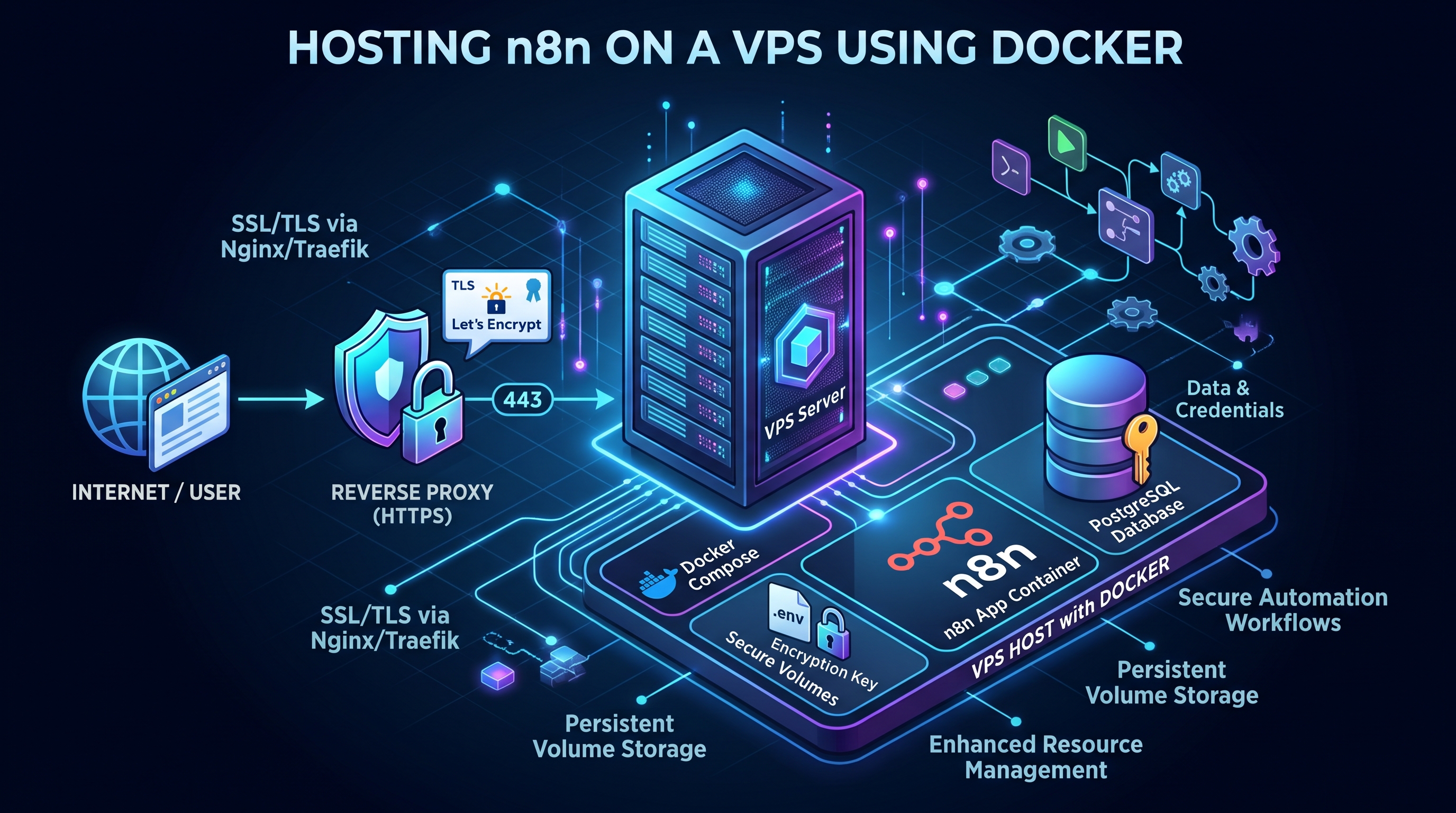
For users who want more control over their data, workflows, and infrastructure, hosting n8n on a VPS is an attractive option. A Virtual Private Server gives you an environment where your automation workflows can run continuously without depending on your personal computer.
In this guide, you will learn what n8n VPS hosting is, how to deploy n8n using Docker, how to secure your installation, and which automation workflows you can build.
What Is n8n?
n8n is a workflow automation platform that connects different applications and services so they can exchange information and perform tasks automatically.
Instead of manually transferring information between tools, you can create workflows that handle repetitive processes.
For example, when a customer submits a contact form on your website, an n8n workflow can:
- Receive the form submission.
- Process the customer's information.
- Save the information in your CRM.
- Notify your sales team.
- Send an automatic confirmation email.
- Create a follow-up task.
All these actions can happen automatically after the original form submission.
n8n supports integrations with many applications and services, along with custom API connections and AI-powered workflows.
You can explore its official documentation at n8n Documentation.
What Is an n8n VPS?
An n8n VPS is a virtual private server configured to host an n8n installation.
Instead of running your workflows on a personal laptop or desktop computer, you install n8n on a cloud server that remains available online.
This gives your automation system an environment that can operate continuously.
Why Use a VPS for n8n?
1. Run Workflows 24/7
A VPS can remain online even when your personal computer is turned off. This is useful for scheduled workflows, webhooks, customer notifications, and monitoring tasks.
2. More Control Over Your Infrastructure
With self-hosted n8n, you manage your server environment and decide how your applications, databases, and supporting services are configured.
3. Greater Data Control
You can manage your server storage, backups, access permissions, and deployment configuration.
However, self-hosting also means you are responsible for server security, maintenance, and updates.
4. Connect Multiple Applications
You can use n8n to connect business tools, APIs, databases, and communication platforms within a single automation environment.
5. Expand Your Automation Projects
As your workflows grow, you can upgrade your VPS resources or move to a more advanced deployment architecture.
What Server Requirements Do You Need to Run n8n?
The resources you need depend on the number of workflows, execution frequency, database size, and types of operations you perform.
Here is a practical starting configuration for a modest self-hosted installation:
| Server Resource | Suggested Starting Configuration |
|---|---|
| CPU | 2 vCPUs |
| RAM | 4 GB |
| Storage | 40–80 GB SSD or NVMe |
| Operating System | Ubuntu Linux |
| Runtime | Docker and Docker Compose |
| Network | Public IP and domain |
These are planning recommendations, not universal minimum requirements published by n8n.
For more demanding environments, consider additional RAM, CPU resources, and a separate PostgreSQL database.
If your workflows process large files, execute multiple tasks simultaneously, or use browser automation, you may need more resources.
You can also read our guide to AI Agent Server Requirements to better understand how to choose server resources for different workloads.
How to Install n8n on a VPS Using Docker
Docker is a practical way to deploy n8n because it packages the application and its dependencies into a container.
The following example demonstrates a basic single-instance setup.
Step 1: Prepare Your VPS
Start with a Linux VPS running Ubuntu.
Connect to your server through SSH and make sure Docker Engine and Docker Compose v2 are installed.
Check your installation:
docker --version
docker compose version
If Docker is not installed, follow the official Docker installation instructions.
Step 2: Create an n8n Project Directory
Create a dedicated directory:
mkdir -p ~/n8n
cd ~/n8n
This directory will contain your Docker Compose configuration and environment variables.
Step 3: Configure Environment Variables
Create a file named .env:
N8N_HOST=automation.example.com
N8N_PROTOCOL=https
N8N_PORT=5678

N8N_WEBHOOK_URL=https://automation.example.com/
N8N_PROXY_HOPS=1

N8N_ENCRYPTION_KEY=replace_with_a_long_random_secret

GENERIC_TIMEZONE=Etc/UTC
TZ=Etc/UTC
Replace automation.example.com with your actual domain or subdomain.
Generate a strong encryption key:
openssl rand -hex 32
Use the generated value instead of the placeholder.
Keep this key private. It is important for protecting stored credentials and must be preserved securely as part of your backup strategy.
Step 4: Create the Docker Compose File
Create a file named compose.yaml:
services:
  n8n:
    image: docker.n8n.io/n8nio/n8n:latest
    restart: unless-stopped

    ports:
      - "127.0.0.1:5678:5678"

    environment:
      N8N_HOST: ${N8N_HOST}
      N8N_PROTOCOL: ${N8N_PROTOCOL}
      N8N_PORT: ${N8N_PORT}
      N8N_WEBHOOK_URL: ${N8N_WEBHOOK_URL}
      N8N_PROXY_HOPS: ${N8N_PROXY_HOPS}
      N8N_ENCRYPTION_KEY: ${N8N_ENCRYPTION_KEY}
      GENERIC_TIMEZONE: ${GENERIC_TIMEZONE}
      TZ: ${TZ}

    volumes:
      - n8n_data:/home/node/.n8n

volumes:
  n8n_data:
This configuration runs n8n and stores persistent application data in a Docker volume.
The port is bound to localhost rather than exposed directly to the public internet. A reverse proxy will provide secure external access.
For production environments, consider using a tested and pinned n8n image version rather than automatically adopting every new release.
Step 5: Configure a Domain and HTTPS
Create a DNS A record for your subdomain:
automation.example.com
Point it to your VPS public IP address.
Next, configure a reverse proxy such as Caddy.
A basic Caddy configuration looks like this:
automation.example.com {
    reverse_proxy 127.0.0.1:5678
}
Caddy can automatically obtain and renew HTTPS certificates when your domain and network configuration are correct.
Make sure ports 80 and 443 are reachable and keep the internal n8n port restricted to localhost.
The N8N_WEBHOOK_URL and N8N_PROXY_HOPS settings are important when n8n runs behind a reverse proxy.
For additional information, see the official n8n Reverse Proxy Configuration Guide.
Step 6: Start n8n
Once your configuration is ready, run:
docker compose up -d
Check whether the container is running:
docker compose ps
View the application logs:
docker compose logs -f n8n
After configuring your reverse proxy, visit:
https://automation.example.com
You should see the n8n setup screen.
Create your owner account and configure your first workflow.
Important: This is a basic single-instance deployment. Larger production systems may require PostgreSQL, additional monitoring, and a separate task execution architecture.
5 Useful Automation Workflows You Can Build With n8n
After installing n8n on your VPS, you can start building practical automation workflows.
1. Automated Lead Management
When a customer submits a contact form, n8n can collect the information, store it in a CRM, notify your sales team, and create a follow-up task.
This helps businesses organize incoming inquiries without manually transferring customer details between applications.
2. Website Monitoring and Notifications
You can create workflows that regularly check whether your website or an API endpoint is responding.
When a service becomes unavailable, n8n can send an alert through Telegram, Slack, or another supported notification service.
3. AI-Powered Customer Support
You can connect an AI model to your workflow and use it to classify incoming questions, summarize messages, or prepare suggested responses.
For important customer communications, keep a human review step before sending sensitive or high-impact responses.
4. Automated Business Reports
A workflow can collect information from different sources, process the results, and send a daily or weekly report.
For example, an online business could combine website inquiries, sales records, and customer support information into one report.
5. Database Synchronization
If your business uses multiple applications, n8n can help synchronize selected information between databases and external services.
You can create rules to prevent duplicate records and keep important customer information updated.
How to Secure Your Self-Hosted n8n Instance
Running n8n on your own VPS gives you more control, but it also means you must protect your server and the workflows running on it.
Here are essential security practices.
Use HTTPS
Never expose your automation dashboard through an unsecured public connection. Configure HTTPS using a trusted reverse proxy.
Protect Your Credentials
Use strong credentials and keep API keys, passwords, and encryption keys out of public repositories and shared configuration files.
Limit Network Access
Do not expose unnecessary server ports. Keep internal services private whenever possible.
Use Reliable Backups
Back up your n8n data directory and database. If you use PostgreSQL, back up the database separately as well.
Remember that workflow exports alone are not a complete backup of your entire n8n installation.
Update n8n Carefully
Monitor new releases and review relevant changes before upgrading production installations. Take a full backup before important updates.
Review Your Installed Nodes
Avoid installing untrusted community nodes. Some nodes can perform sensitive operations or interact with your server environment.
You can also run the built-in security audit:
n8n audit
Official reference: n8n Security Audit.
n8n Cloud vs Self-Hosted n8n on a VPS
Should you use n8n Cloud or host n8n yourself?
The right choice depends on how much infrastructure control you need and whether you want to manage your own server.
| Feature | n8n Cloud | Self-Hosted VPS |
|---|---|---|
| Server management | Managed by n8n | Managed by you or your provider |
| Infrastructure control | More limited | Greater control |
| Server configuration | Managed environment | Custom configuration |
| Data storage control | Cloud service | Your own infrastructure |
| Maintenance | Less server administration | You handle updates |
| Custom deployment | Platform-dependent | Flexible |
| Technical responsibility | Lower | Higher |
n8n Cloud is convenient for users who do not want to manage infrastructure.
Self-hosting is attractive to developers and businesses that want more control over their server, deployment, storage, and integrations.
Neither option is automatically better for every project.
Why Choose an AI-Managed VPS for Automation?
Traditional VPS hosting gives you a server, but you are still responsible for many infrastructure tasks.
You may need to configure Docker, manage applications, monitor server resources, troubleshoot problems, and maintain your services.
An AI-managed VPS adds another layer to this experience.
Instead of handling every server operation manually, you can use a Personal AI to assist with deployment, configuration, monitoring, and maintenance.
With AgentVPS, the goal is to combine private cloud infrastructure with an AI assistant that helps you manage your server through natural language.
This can be useful when building automation environments that involve multiple applications, databases, and supporting services.
Explore the AgentVPS platform and compare the available VPS plans before choosing a configuration for your project.
Frequently Asked Questions About n8n VPS Hosting
Can I run n8n on a VPS 24/7?
Yes. A VPS can host n8n continuously, allowing scheduled workflows and production webhooks to operate without depending on your personal computer. Actual availability depends on your hosting provider, server configuration, and maintenance.
Do I need Docker to install n8n on a VPS?
No. n8n supports multiple installation methods, including Docker, npm, and Docker Compose. Docker is a practical choice for many self-hosted deployments because it simplifies application management.
Does n8n require a GPU?
Most standard n8n workflows do not require a GPU. If your workflows call external AI APIs, the AI computation usually happens through the external provider. Running local AI models is a different workload and may require additional hardware.
Can I connect n8n to ChatGPT or other AI models?
Yes. You can build AI-powered workflows using supported integrations and API connections. Your chosen AI provider may charge separately for API usage.
Is self-hosted n8n free?
n8n provides a self-hosted Community edition under its applicable license terms. However, you still need to pay for infrastructure, and some advanced features may require a different edition or license.
What happens if my VPS restarts?
A properly configured Docker deployment can automatically restart the n8n container. Persistent storage is important to ensure that your workflows and application data survive container restarts.
Is hosting n8n on a VPS secure?
It can be secure when properly configured. Use HTTPS, strong authentication, appropriate network restrictions, protected encryption keys, regular updates, and tested backups.
Final Thoughts
Hosting n8n on a VPS is a practical way to build an automation environment that runs continuously and gives you more control over your infrastructure.
Whether you want to automate customer communication, connect business applications, synchronize databases, or build AI-powered workflows, n8n provides a flexible foundation.
The most important step is choosing the right hosting environment, configuring it securely, and starting with workflows that solve real problems.
As your automation requirements grow, you can expand your server resources and deployment architecture.
If you want to spend less time managing infrastructure and more time building useful automation, an AI-managed VPS can make that process easier.
Explore AgentVPS and find a cloud server that fits your next automation project.
Official Resources
Was this helpful?
Be the first to like this article Tap the thumb to like this article — you can optionally share more detail afterward.